
Best Sales Funnel Builders: 5 Top Online Business Software Tools
It’s true, there are quite a few popular sales funnel builders to choose from.
Choose the wrong sales funnel software?
And you face the possibilities of encountering many problems:
- Longer periods to launch your funnels.
- Stress from trying to learn complicated features.
- And don’t forget about wanting to throw your computer out the window.
I’ve been there before, and it’s certainly not a fun scenario.
On the other hand, if you pick the best sales funnel builder for you wanted and needs:
- You’ll be able to launch your sales funnels at lightning speed.
- You won’t have to stress out about learning complicated new features.
- And you’ll overall have a much smoother process, saving time, effort, and even money.
It’s safe to say that picking the right sales funnel builder for you is important.
That’s why I created a list of the best sales funnel builders for you to pick from.
And to make things even better?
I’ll go through the reasons why you’ll want to use every sales funnel software.
So be sure to keep on reading, as I’ve got plenty of helpful information for you.
Helpful Note: Use the Table of Contents below to jump to a specific section if needed.
ClickFunnels

Up first on the list we have the popular and ever-growing software named ClickFunnels.
This sales funnel software was created by Russell Brunson back in 2013.
Since then, Russell Brunson has accumulated well over 100,000 paying customers.
This is a sales funnel builder that will work for you if:
- You’re looking to sell any type of product, offer, or service.
- You have any type of online or offline business.
All of these sales funnel builders will work for any type of business.
At the end of the day?
This sales funnel software and the rest of the sales funnel builders, will help you:
- Capture leads.
- Make more sales.
- And convert at a much higher rate.
Let’s take a look at what this sales funnel builder has to offer you.
ClickFunnels Biggest Benefits And Tools
There’s a lot to like about this sales funnel software, especially if you love simplicity.
Let’s take a look at a few of the popular sales funnel benefits that come with ClickFunnels.
ClickFunnels Completely Customizable Sales Funnels And Landing Pages
The possibilities are endless when it comes to creating pages and funnels.
Even better, this funnel builder provides you with a smooth process for creating these funnels.
Cliff Notes: This sales funnel software is pretty easy to use.
First, you start by choosing the appropriate type of sales funnel that you’d like to create.

As shown in the image above, you can pick from:
- Sales Funnel.
- Product Launch.
- Membership.
And there are even more options once you narrow down what you want.
For example, when you pick the Sales Funnel option above, you have the option to choose from:
- Collecting Emails (perfect for email marketing, obviously).
- Selling Your Product.
- Hosting Your Webinar.
You can even create a custom funnel, which is easy to do (ClickFunnels gives you the tools).
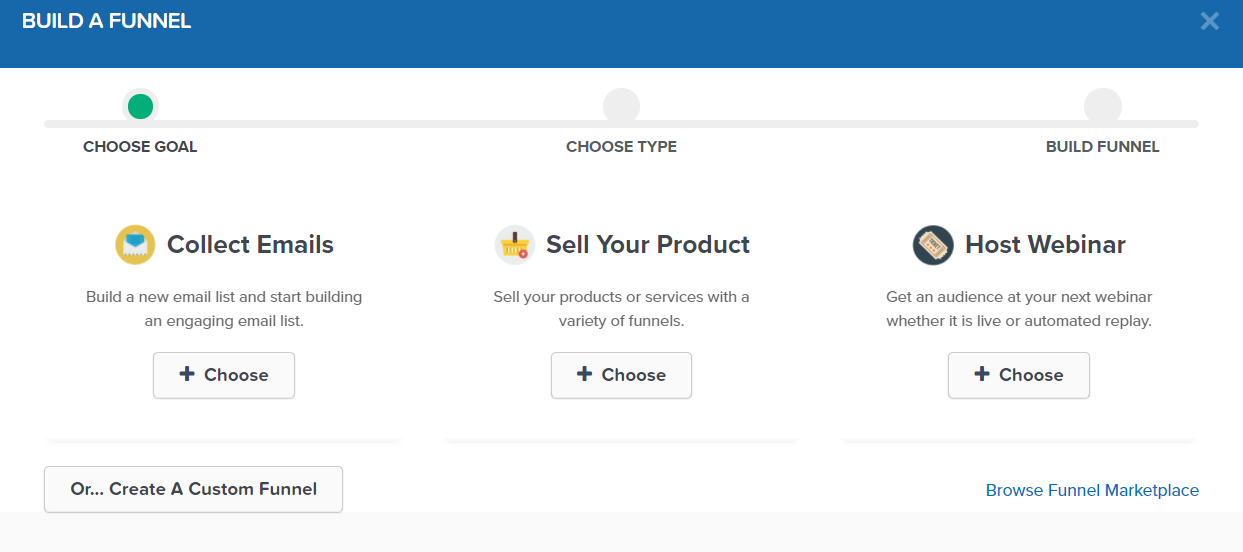
The picture that I added above will show you exactly what I’m referring to:
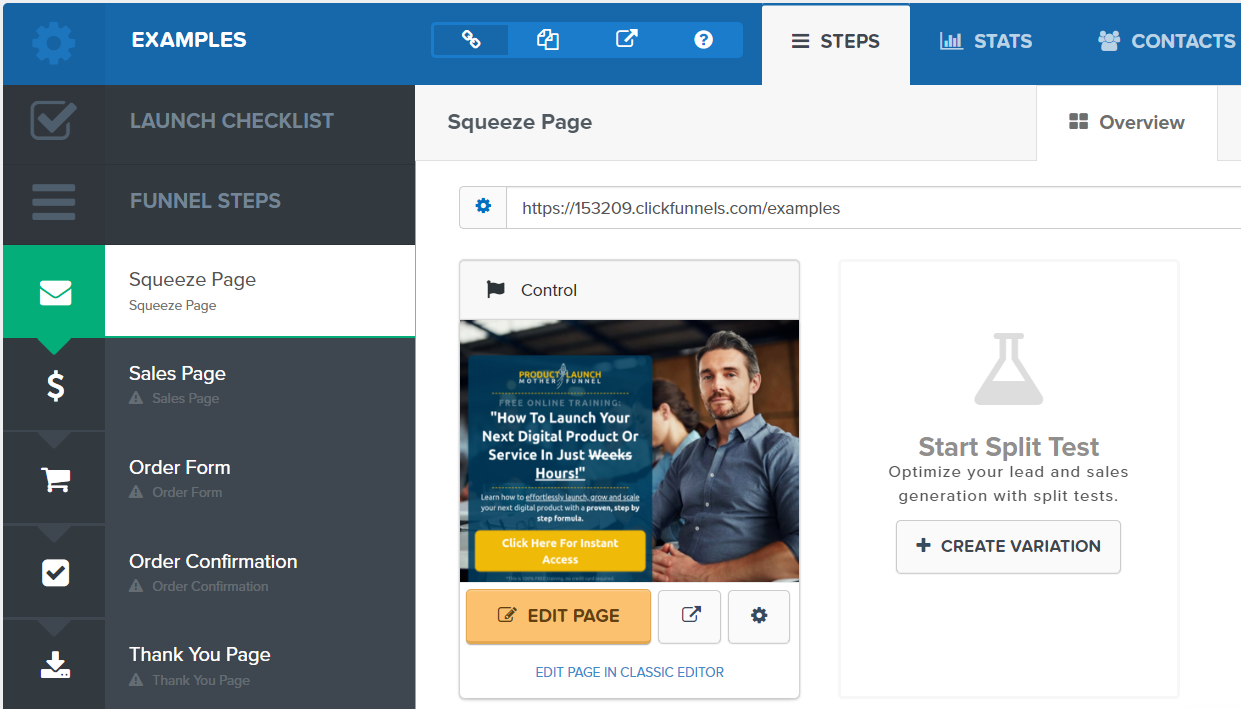
After making your choice, this software will direct you to the sales funnel builder steps.
All of the steps for your funnel will be on the left side of the screen.
You can customize them to your liking as well, including being able to:
- Delete funnel steps.
- Add more funnel steps.
- Drag and drop the order of the steps.
And so on.
See the image down below for a good idea of what it looks like setting up your funnel.
When creating a funnel, another fantastic aspect is going to be the landing page templates.
ClickFunnels is filled with many high-converting landing page templates.
They have well over 100 landing page templates just for lead generation pages.
Keep in mind that this funnel builder features page templates for every single type of funnel step:
- Sales letters.
- Squeeze pages.
- Webinar pages.
- Checkout pages.
- Membership pages.
- Thank you and download pages.
- One-click upsell and downsell pages.
And many other miscellaneous sections like eCommerce, contact, about, etc.
Related Article: See more ClickFunnels examples here.
Just browse around and click from your mouse to select your landing page template.
After selecting your template, you will then be free to edit your landing page.
This is where this sales funnel software really shines.
You can thank their drag-and-drop editor as it’s about as smooth as it gets.
Down below is an example of the landing page builder from the inside.

There aren’t too many steps when it comes to creating your high-converting landing pages:
- Select what you want to add.
- Drag and drop it on the appropriate section.
- Edit to your liking.
Plus, you can always use a template to get yourself up and running much quicker.
And if you want to get your sales funnel up and running even quicker?
You can utilize ClickFunnels share funnels that other customers have created.
When you consider just how much time it would take to create a sales funnel without software?
The entire process for completing a complete sales funnel is like lightning in a bottle.
And when it comes to having more tools for selling your products?
This sales funnel builder has certainly got you covered.
ClickFunnels Checkout Pages And Sales Maximizers

When utilizing a sales funnel, one of the main goals will be to make sales (obviously).
With ClickFunnels, you won’t need to worry about getting any separate shopping cart software.
ClickFunnels comes with their very own mobile-optimized shopping cart.
Creating checkout pages is as simple as creating any other type of landing page too.
This reason for this is because it uses the same drag-and-drop editor as always.
If you want to rev up your sales with this sales funnel software?
There are two tools that you’ll want to leverage that relate to customers making a purchase.
ClickFunnels Order Bump

An order bump is another offer that gets added to your mobile-optimized checkout page.
After you drag-and-drop this section onto your page, you are free to:
- Edit the text and colors.
- Change around the pricing.
- As well as move it wherever you like on your checkout page.
Order bumps have been tested and proven to help you make more sales.
After all, it allows your customers to make another purchase by simply checking off a box.
You can see what I mean in the example that I added above.
Related Reading: How the ClickFunnels order bump works.
This feature all by itself can help you pay for this sales funnel software alone.
That of course, depends on the plan that you pick should you choose to try ClickFunnels.
More information about the pricing plans later though.
Here is yet another great tool for maximizing your sales (that is also easy to use).
ClickFunnels One-Click Upsells And Downsells
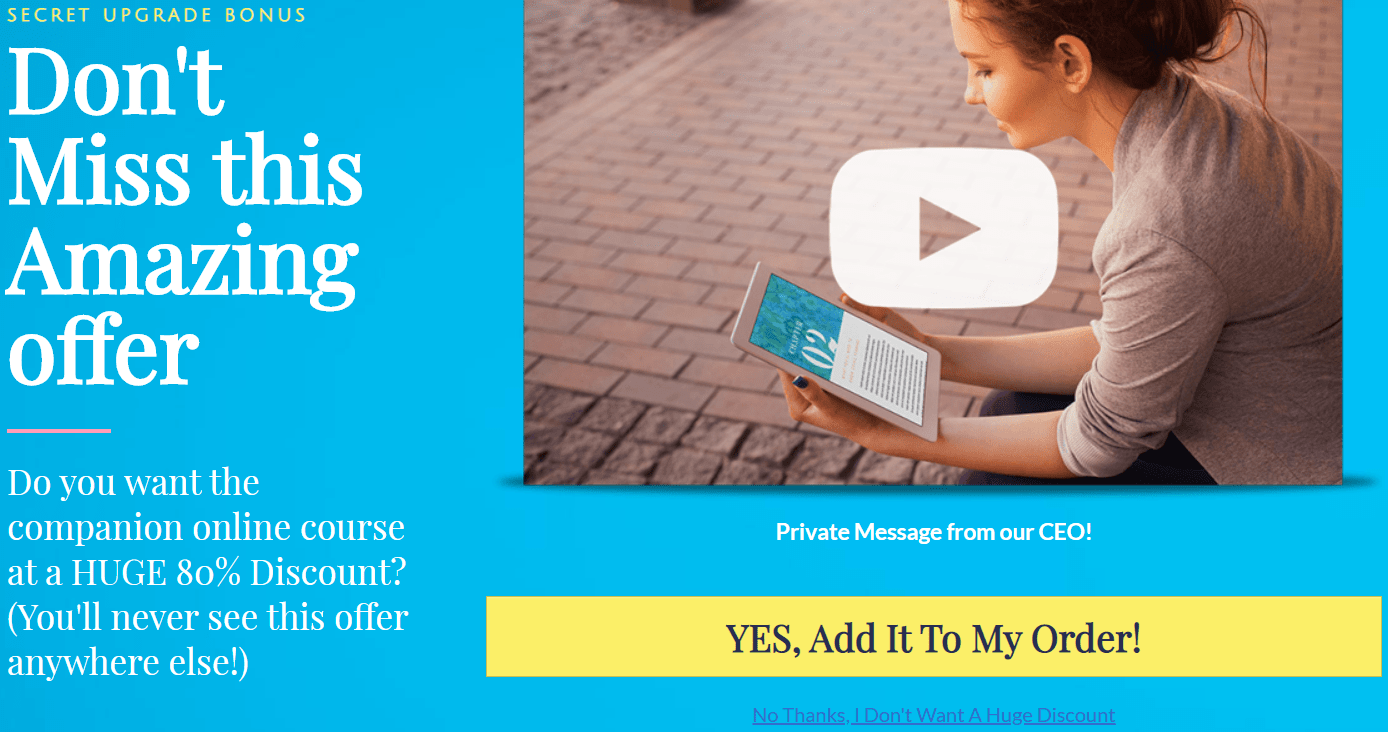
After someone purchases from your checkout page, they get directed to your upsell pages.
However, these aren’t your everyday upsell pages.
ClickFunnels allows your customers to purchase more with just one click of their mouse.
This is referred to as a one-click upsell.
This is also beneficial because:
- It makes the buying process much easier.
- Making the buying process easier allows you to make more sales.
Once again, this is yet another proven way to increase your sales with ClickFunnels.
Just make sure that you’re utilizing the right offer in the value ladder for your upsell.
There are plenty more tools that ClickFunnels offers as well.
However, when a sales funnel software does so much, what’s the cost going to be like?
Let’s take a look at the price now for this funnel builder.
How Much Is ClickFunnels?

The cost of this sales funnel software is pretty straight-forward.
It can also be a little intimidating at first, so don’t worry about the bigger pricing plan.
I’ll explain that very soon, but here are the three premium plans:
- ClickFunnels (basic) Plan is $97 per month.
- ClickFunnels Platinum Plan is $297 per month.
- ClickFunnels Two Comma Club X Plan is $1,997 per month.
As I said, don’t worry about that last Two Comma Club X plan.
It’s only for their mastermind coaching and it is very rarely available.
So we are left with two plans, one at $97 per month and the other $297 per month.
Both of the plans allow you to create and utilize:
- Webinars.
- Sales funnels.
- Landing pages.
- Membership pages.
- Secure checkout pages.
- One-click upsell and downsell pages.
And a whole lot more.
There are going to be a few differences when it comes to perks and the plan that you pick.
Let’s take a closer look at the two main plans that come along with this sales funnel software.
ClickFunnels (Basic) Plan
Here are a few of the perks that come with the first plan.
- 20 sales funnels.
- 100 landing pages.
- 20,000 monthly visitors.
ClickFunnels Platinum Plan
Here are a few of the perks that come with the ClickFunnels Platinum Plan:
- Unlimited sales funnels.
- Unlimited landing pages.
- Unlimited monthly visitors.
- Access to ClickFunnels Backpack feature.
- Access to ClickFunnels Follow-up Funnels feature.
The Backpack feature is going to be their affiliate management system.
This is going to be helpful if you want to recruit an army of affiliates to help sell your products.
Follow-Up Funnels is ClickFunnels’ version of an email marketing autoresponder.
It comes with many perks like being able to:
- Send broadcasts.
- Utilize abandoned cart messages.
- Send automated emails (like an email marketing autoresponder).
And a whole lot more.
In a nutshell, that’s what ClickFunnels has to offer in terms of their pricing plans.
You can read up more about that topic down below if you’d like more information.
Related Post: ClickFunnels pricing and costs.
Lastly, ClickFunnels recently added an annual plan that allows you to save a bunch of money.
I’ll add that related post down below if you’re big on saving money.
Related Post: ClickFunnels annual plan info.
Let’s finish up this section about why you may or may not want to use this sales funnel builder.
Should You Use ClickFunnels?
No sales funnel software is perfect.
That’s why I’m going to create a section for each tool featuring the overall pros and cons.
Let’s start with a few reasons why you might not want to use this funnel builder.
ClickFunnels Dislikes
- Customer support could be faster.
- The ClickFunnels membership site area is overall pretty weak.
First and foremost, I want to address that there have been some complaints about their support.
From my experience, I have had nothing but very helpful customer support.
There’s been a few times when support created a video walkthrough to help me out.
On the other hand, it would be nice if support got back to you a little quicker.
The alternative is asking your support question in their group of 100,000+ people.
Thanks, but no thanks.
Lastly, their membership site area is overall pretty bland.
I’ve created multiple membership sites and they’ve done what they are supposed to do.
However, there aren’t many advanced features when it comes to creating memberships.
All in all, these are very small blemishes when it comes to this sales funnel software overall.
Let’s change the mood and talk about what this sales funnel software does extremely well.
ClickFunnels Likes
- Easy to use.
- A wide variety of tools to help maximize your sales.
- You won’t need many other tools when using ClickFunnels.
- You can run live and automated webinars with ClickFunnels.
- The share funnel feature is great for getting funnels done for you.
- Seamlessly simple to create and launch landing pages and funnels.
- You don’t need to be a tech wizard to use ClickFunnels (no coding needed).
As I highlight in my ClickFunnels review, this tool comes with a ton of tools and features.
A few of these features can help you maximize your revenue, such as:
- Their shopping cart.
- The order bump attachment.
- As well as one-click upsell and downsell pages.
Those three features above can pretty much help you pay off the ClickFunnels price tag.
This becomes even more true if you’re selling mid and high-ticket offers.
You also won’t need a bunch of other tools if you should decide to use ClickFunnels.
If you don’t want to utilize their $297 Platinum Plan?
You can always attach a third-party email marketing autoresponder with ClickFunnels.
But you won’t need separate:
- Webinar software.
- Shopping car software.
- Or even separate AB split testing software.
Lastly, creating marketing pages and sales funnels with ClickFunnels is a walk in the park.
Their drag-and-drop editor doesn’t take a whole lot of time to get used to it.
And if you want an even faster option, there is the ability to get shared funnels from other users.
There’s a very big reason why ClickFunels has accumulated well over 100,000 customers.
They come with a free trial, so if you have any interest in them at all?
Be sure to take advantage of their free trial and get started down below:
If you need help with getting started, the tutorial down below will help you out.
Helpful Post: ClickFunnels free trial steps.
So that’s the sales funnel software ClickFunnels and a little bit of what they have to offer.
So is ClickFunnels going to be the best sales funnel software around?
I currently think that they are the best sales funnel software on the market.
Not by a whole lot though.
In fact, the next premium sales funnel builder will also knock your socks off.
Kartra

Kartra is going to be next on the list of the best sales funnel software.
Kartra is very similar to ClickFunnels in a lot of different ways as well.
Plus, I have rated them to be one of the best alternatives to ClickFunnels.
Even though they haven’t been out for as long, they pack a serious marketing punch.
Created by Andy Jenkins a few years back, Kartra’s tagline is:
Your online business made easy.
They certainly hit the nail on the head there (plus they are easy to use).
Unfortunately: Andy Jenkins passed away not too long ago.
Nevertheless, Kartra has still been going onwards and upwards ever since then.
Kartra allows you to create and launch your sales funnels online:
- Without needing to hire a team of copywriters.
- And without needing web developers, designers, or even system integrators.
Let’s take a look at what Kartra has to offer in terms of tools and features.
Kartra’s Biggest Benefits And Tools
Kartra is very close to being a 100% all-in-one builder.
After all, Kartra does everything that you could ever ask for except for:
- Live webinars.
- Automated webinars.
Webinars aren’t included simply because their company already has separate software for that.
Helpful Note: Those software tools are WebinarJam and EverWebinar.
Here are some of the key tools that come along with one of the best sales funnel software.
High-Converting Landing Pages, Sales Funnels, and Done For You Campaigns

After all, Kartra is a sales funnel builder, so these features should be expected.
However, you’ll be happy to know that creating a sales funnel is a pleasant process.
You kick-start the process for creating your powerful sales funnel as you might expect:
- Choose the type of landing page or sales funnel that you’d like to utilize.
- Pick your template (or start from a blank page).
- Get started.
It’s also important that you know a few of the types of pages that you can create with Kartra.
After all, landing pages are the glue that holds your sales funnel together.
Here are a few:
- Squeeze pages.
- Thank you pages.
- Long sales pages.
- Video sales pages.
- Coming soon pages.
- Product launch and review pages.
And that’s just the tip of the iceberg (so to speak).
You can see a few more (along with some squeeze page templates) down below:
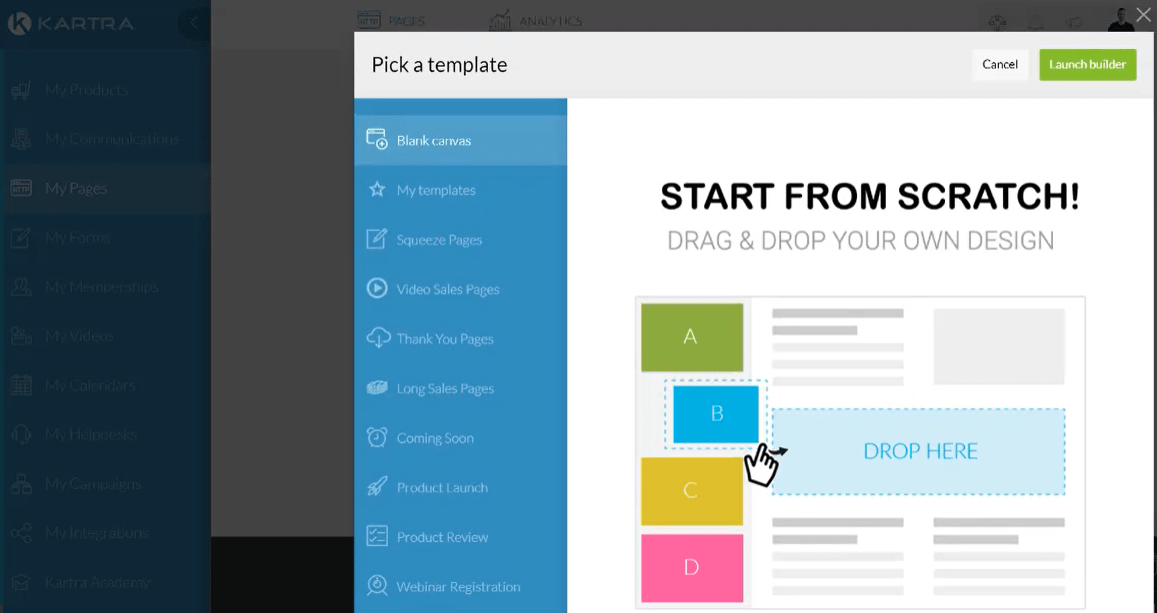
So after you pick your template (or just start from scratch)?
You’ll get taken to Kartra’s drag-and-drop editor which is pretty fun to use.
This is another reason why Kartra performs so well in terms of creating a sales funnel.
Kartra is simple to navigate around and easy to use.
And this is true for any type of landing page that you’re looking to put together.
Down below is an example of what it looks like when utilizing their landing page editor:
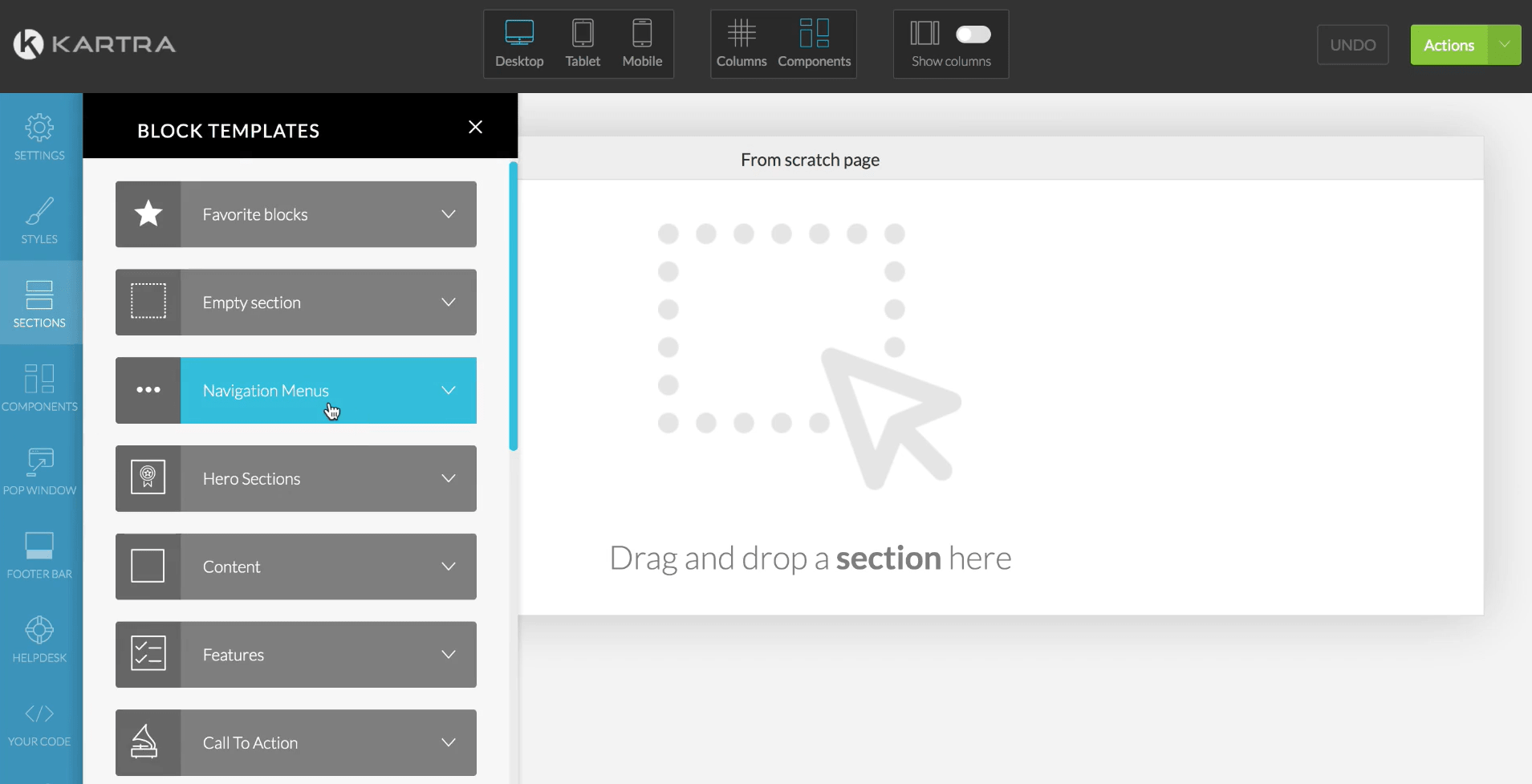
The top of the page will help you when it comes to how your landing page looks on:
- Desktop.
- Mobile.
- Tablet.
Everything else will mostly be on the left side of the screen (as shown in the picture above).
The Sections tab, also on the left side, has many helpful tabs for building your pages.
Especially block templates.
These are massive sections that you can drag-and-drop into the middle of your page.
After adding them in, you simply edit them as you would with any other type of section.
Down below is an example of a block template being added to a landing page:
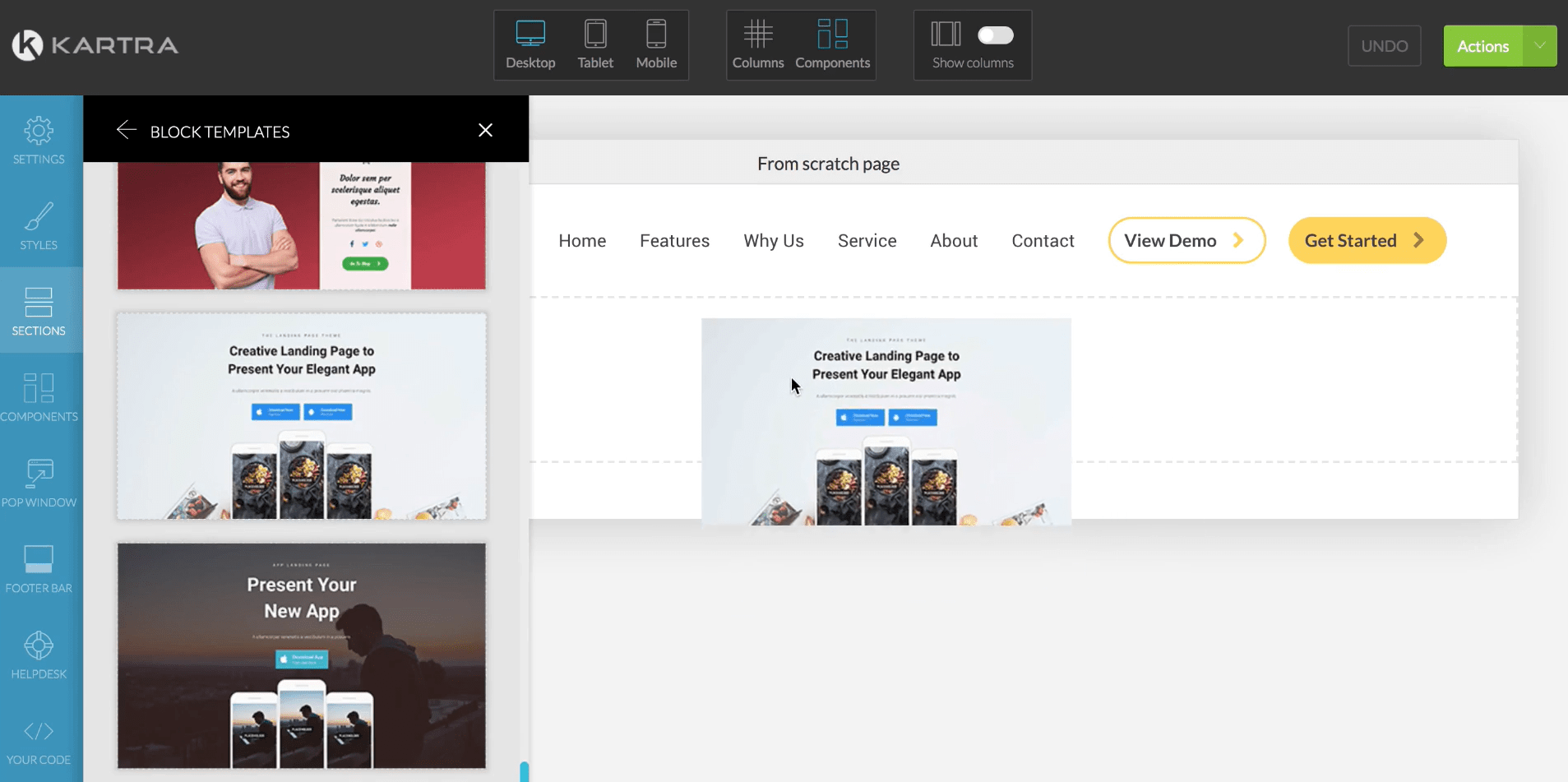
The block templates will ultimately help you when it comes to creating marketing pages.
And if you want to kick it up a notch?
Kartra also comes along with quite a few done-for-you campaigns.
These are complete sales funnels that were created by legends such as:
- Andy Jenkins.
- Frank Kern.
And in case you didn’t know, these campaigns have generated millions of dollars.
Just about everything is done for you.
All you need to do is add-in:
- Your offer as well as the name and the price.
- Some extra information to describe your offer.
And not too much more.
Here is an example of a few done-for-you campaigns that you can choose from:

The campaign that you pick is going to depend on your goal.
However, this is one of the fastest ways to get your sales funnel up and running.
Helpful Note: Kartra is the only sales funnel builder that comes with done-for-you campaigns.
With Kartra pages, you can also:
- Utilize forms for capturing leads.
- Use AB split-testing for your landing pages.
- Utilize pop-ups to capture more leads and make more sales.
Your landing pages also come with helpful statistics such as:
- Goals.
- Visitors.
- Revenue.
- Time on-page.
And even conversions by the device as well as a scroll heatmap.
Let’s look at a couple more powerful Kartra tools and features.
Kartra Mail, Campaigns, Automation, And Other Unique Features
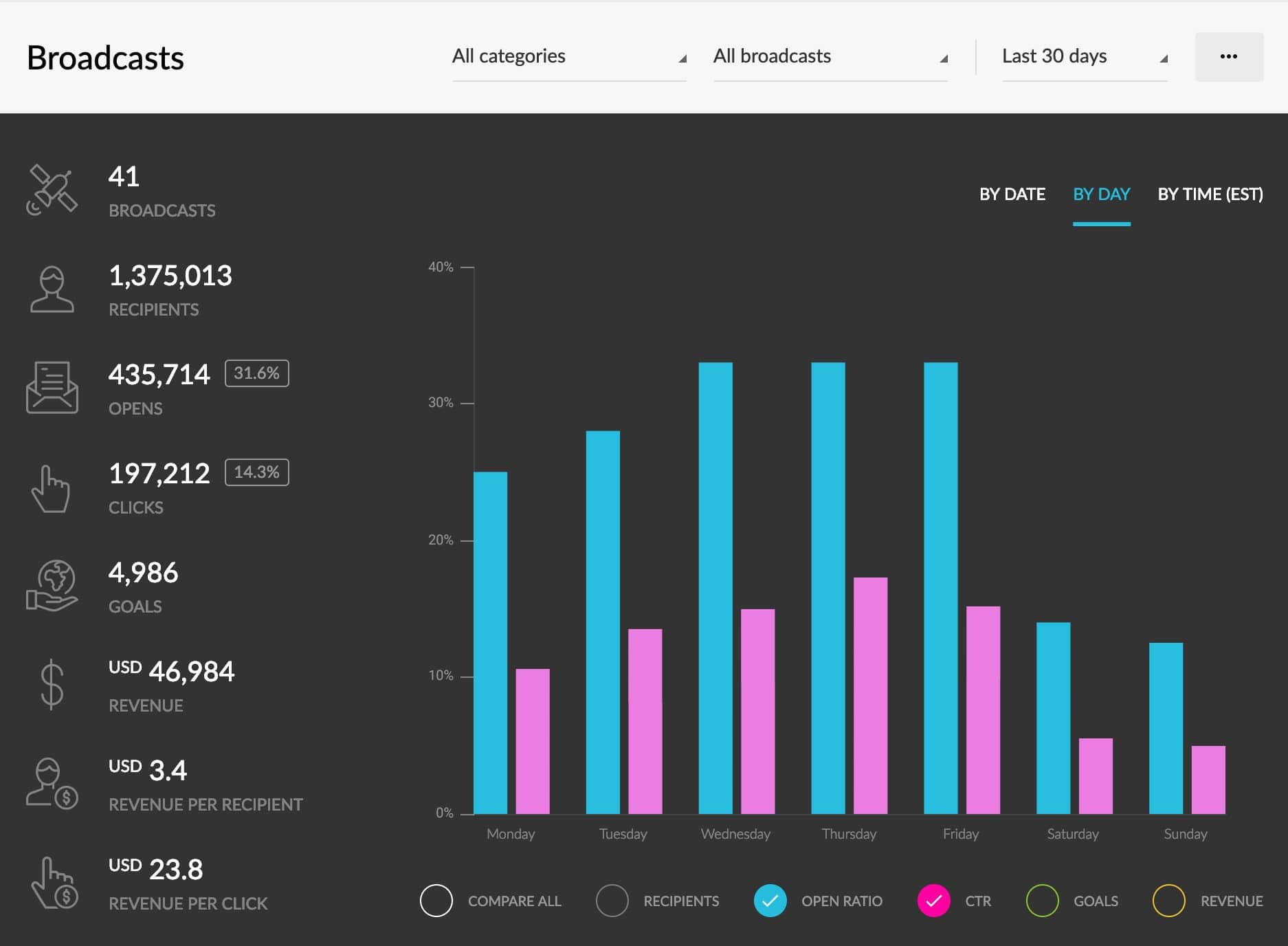
A lot of people don’t know that Kartra comes along with its email marketing platform.
This can be good or bad, depending on how you look at it:
- It’s good if you don’t want to use any other third-party email software.
- It’s bad if you do want to use any other third-party email software.
Nevertheless, Kartra has all of the regular bells and whistles when it comes to sending emails:
- Stats.
- Broadcasts.
- Follow-up messages.
However, Kartra shines when it comes to email marketing automation.
This is a feature that can be compared to the popular ActiveCampaign email marketing software.
Down below is an example of what this looks like:
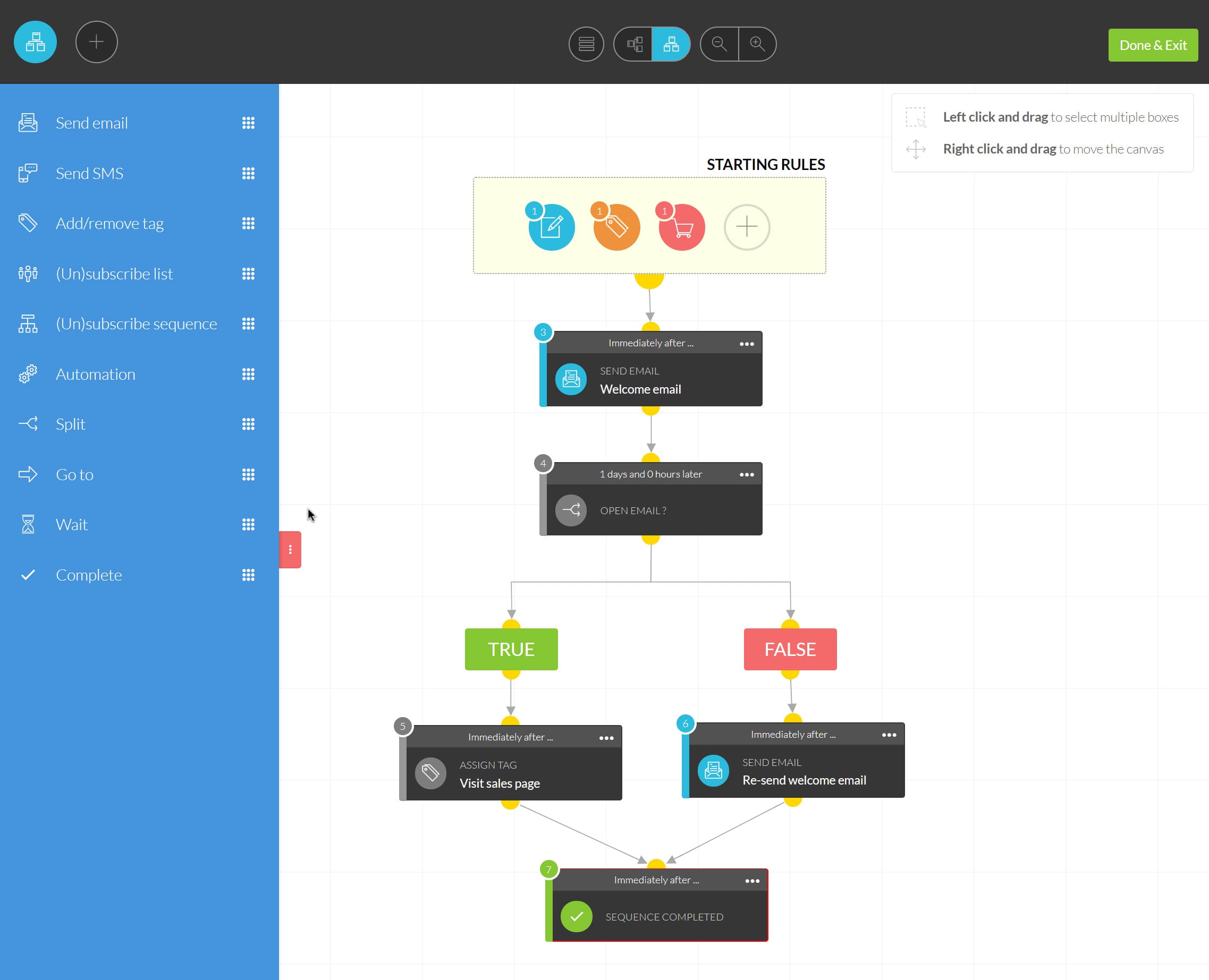
You can also see what Kartra has to offer on the left side of the picture above.
This is one of their most advanced sections of Kartra.
And while email marketing automation might have a slight learning curve to it?
It’s a feature that goes hand-in-hand when it comes to creating a sales funnel.
Kartra also has a few unique parks that not many other sales funnel builders offer.
Let’s quickly look at them now.
Kartra Helpdesks

Here is a feature that is currently unique to every sales funnel tool on this page.
Kartra comes with its very own helpdesk for supporting your customers’ needs.
You can provide help in the form of:
- Email.
- Skype.
- Live chat.
- A ticket system.
It’s really up to you.
This is beneficial because you won’t need to purchase separate helpdesk software.
Kartra Video (And Hosting)

It’s pretty standard that you can use videos within your landing pages and sales funnels.
Video is much different when it comes to Kartra though.
First, Kartra allows you to upload your videos to Kartra’s server.
So they act as their very own video hosting platform (sorry Wistia).
Even better, their videos come with a plethora of helpful marketing perks.
- You can create pop-ups on your videos to capture leads.
- You can tag specific leads based upon how much time they watched.
And plenty more.
This is yet another unique feature that comes along with Kartra.
So how much is this sales funnel builder going to be at the end of the day?
Based on the value that you get, the price is certainly right.
Let’s take a look at that now.
How Much Is Kartra?

There are four plans that you can pick from when it comes to Kartra:
- The Starter Plan is $99 per month.
- The Silver Plan is $199 per month.
- The Gold Plan is $299 per month.
- The Platinum Plan is $499 per month.
There are going to be some differences when it comes to each plan.
Especially the first two plans, so let’s talk about those now.
Kartra Starter Plan
As stated in the name of the plan, this is great for those who are just getting started.
Here are the perks for the Starter Plan (these change for every plan):
- 1 custom domain.
- Up to 2,500 leads.
And here are the perks in terms of what you can use, and exactly how much:
- 15,000 emails per month.
- 50 GB bandwidth.
- Host 100 pages.
- Host 50 videos.
- Sell 20 products.
- Build 2 membership sites.
- Add 1 additional team member.
- Connect 1 helpdesk.
Be sure to take a look at how the perks change when you move to the Silver Plan.
Kartra Silver Plan
This is, by far, one of the most valuable pricing plans that Kartra has to offer.
Here are the perks for the Silver Plan (these change for every plan):
- 3 custom domains.
- Up to 12,500 leads.
And take a look at the upgrades for the Silver Plan:
- Unlimited emails per month.
- Unlimited bandwidth.
- Unlimited pages.
- Unlimited videos.
- Unlimited products.
- Unlimited membership sites.
- Unlimited team members.
- Unlimited helpdesks.
Plus you get access to the Kartra Agency perk.
Pretty crazy, right?
For an extra $100 a month you get a plethora of unlimited perks.
Here’s a little more information when it comes to the last two plans.
Kartra Gold and Platinum Plans
These plans are also going to offer everything included in the previous Silver Plan.
Here is how they are different:
- Kartra Gold offers 5 custom domains and up to 25,000 leads.
- Kartra Platinum offers 10 custom domains and up to 50,000 leads.
At the end of the day, you’d be using the Gold and Platinum plans if you need more leads.
In other words, it’s for the grizzled veterans who have been around for a while now.
Related Reading: More details about the Kartra pricing plans.
Now onto the popular question.
Should You Use Kartra?
So should you use Kartra?
It’s high on the list of the best sales funnel builders, but that doesn’t mean it’s perfect.
Let’s take a look at some of the pros and cons when it comes to Kartra.
Kartra Dislikes
- You have to use their email marketing platform.
- There can be some overcharges when using the Starter Plan.
There’s not a whole lot to dislike about this sales funnel software tool in general.
After all, there are one of the best sales funnel builders for good reasons.
Let’s talk about these minor dislikes.
First and foremost, you have to use the email marketing platform that comes with Kartra.
They currently offer any type of third-party email marketing integrations.
So if you were hellbent on connecting an email marketing tool like Aweber with Kartra?
Then you might be able to do it with Zapier.
As I said, this can either be a pro or con depending on how you look at it.
I’d personally rather have the option to be able to select how I do my email marketing.
Lastly, there can be some overcharges if you end up using the Starter Plan.
These can add up from:
- Sending too many emails.
- Or utilizing too much of your bandwidth.
There were a few complaints about this, so Kartra did at least make things better.
There are no overcharge fees from the Silver Plan and on.
This is yet another reason why the Kartra Silver Plan packs so much value.
These are overall just some small blemishes that might not even affect you.
Let’s take a look at the good when it comes to Katra (there’s a lot)!
Kartra Likes
- Overall easy to use.
- Efficient customer support.
- The Silver Plan packs a ton of value.
- Their drag-and-drop builder is fantastic.
- They have many more powerful features.
- The done-for-campaigns and a very nice touch.
- Unlike ClickFunnels, you want to create membership sites with Kartra.
- Beneficial for any type of marketers (beginner, intermediate, or advanced).
As I mention in my Kartra review, this is a solution that comes with many powerful tools.
What makes them so great is that they don’t sacrifice quality with these features.
Yes, there will be a slight learning curve when it comes to automation (that’s expected).
However, almost everything that Kartra comes with is simple and easy to use.
They are about as similar as it gets to the previous builder, ClickFunnels.
With Kartra though, they have a phenomenal membership are and great customer support.
Related Post: Choosing between Kartra and ClickFunnels.
And don’t forget about the done-for-you campaigns as well.
Kartra can allow you to get your sales funnel up and running pretty quickly.
And who doesn’t want that?
You can try Kartra for an extended amount of time down below (30-days):
I can show you how it’s done as well.
Be sure to read the quick post down below for the full tutorial.
Related Post: Extending your Kartra trial to 30 full days.
So that’s the sales funnels software Kartra, and a little bit of what they have to offer.
Let’s move onto the next best sales funnel builder on the list.
GrooveFunnels
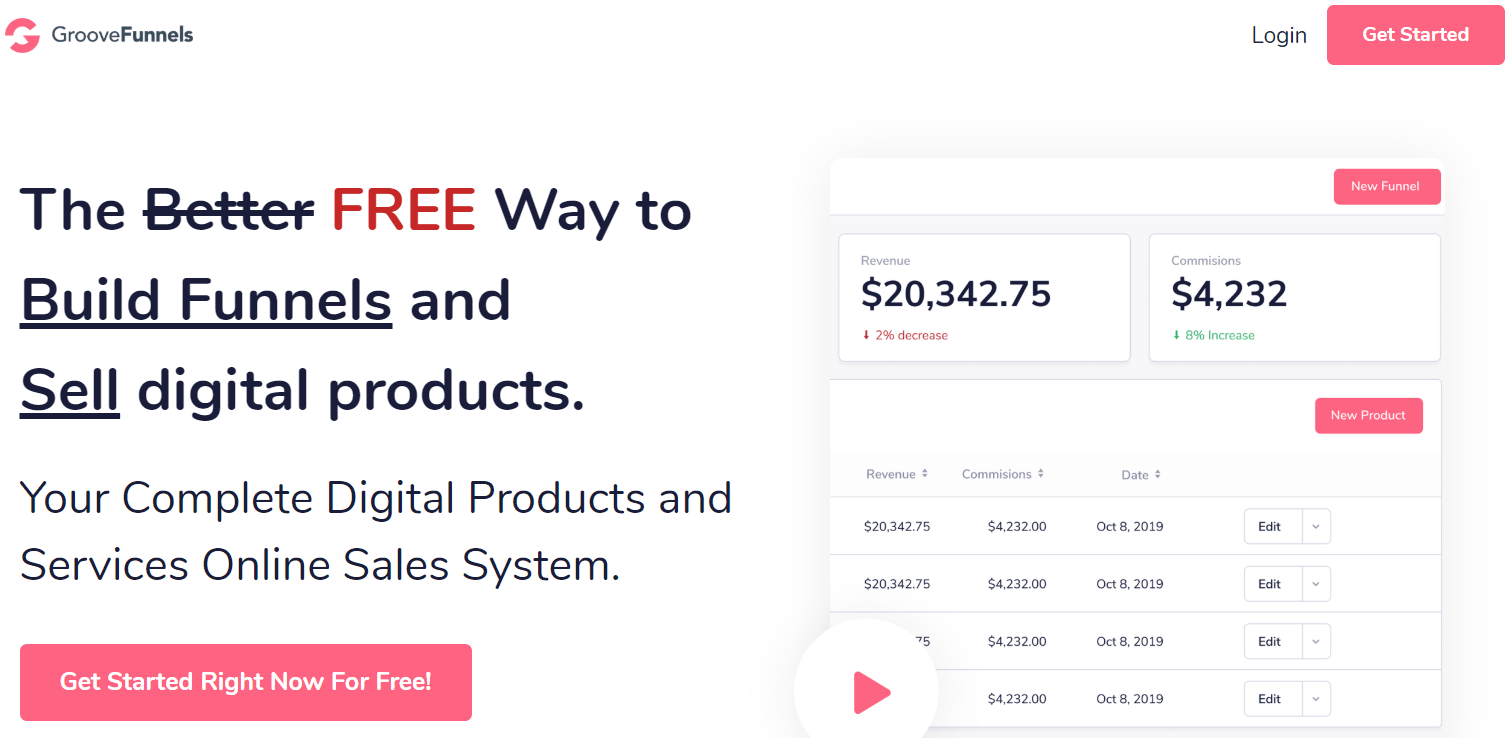
GrooveFunnels is one of the newest funnel building software tools on this list.
So there’s a good chance that you haven’t heard about them yet.
As mentioned in my in-depth GrooveFunnels review, this sales funnel software is considered:
A better free way to build your funnels and sell digital products online.
And is also says in the image that I added above:
Your complete sales systm for digital products and services.
GrooveFunnels is currently in an interesting spot simply because they aren’t 100% live yet.
This is beneficial for you because:
- They still have a lifetime option that you can take advantage of (I’ll talk about that soon).
- This software is currently being tweaked to perfection thanks to plenty of feedback and updates.
Plus, you can save a lot of money by getting GrooveFunels and their one-time payment option.
GrooveFunnels comes with free access to a few of its key tools and features as well.
So yes, you can currently consider this a free sales funnel builder.
The tutorial down below will show you how to accomplish that (don’t worry it’s easy).
Helpful Tutorial: How to get free access to GrooveFunnels.
So what does GrooveFunnels have to offer?
GrooveFunnels Biggest Benefits And Tools
GrooveFunnels will have a lot to offer once everything is said and done.
They will have even more tools than Kartra.
Let’s take a look at a few of the most powerful features now.
Landing Pages, Sales Funnels, And Websites With GrooveFunnels

GrooveFunnels has a specific feature that you’ll love which is called GroovePages.
GroovePages is the section where you’ll be able to create all of your:
- Sales funnels.
- Landing pages.
- As well as websites too.
And just in case you didn’t know?
This is one of the GrooveFunnels that comes along with the free trial/access.
Helpful Note: You get a lite version of the GroovePages funnel builder.
GrooveFunnels overall is almost identical to what Kartra has to offer.
This is simply for the fact that Mike Filsaime helped create both of these platforms.
Related Reading: Kartra versus GrooveFunnels.
So you can expect a great amount of simplicity when it comes to creating your landing pages.
Landing pages and sales funnels, that is.
Let me show you what the process is like when it comes to creating pages and funnels.
You start things by navigating to the GroovePages section which is shown in the picture below:

This is similar to what the page will look like when you create your very first:
- Website.
- Sales Funnel.
- Landing page.
Note: Yes, this can be used as a website builder as well (if you want to go that route).
All you would need to do is click on the New Site button sitting at the top right of the page.
From there, you will have to pick from two options:
- Start with a blank screen (hmmm, how about no thanks).
- Choose one of the many landing page templates that GrooveFunnels has to offer.
Let’s go with option number 2.
Down below is an example of a digital marketing template that comes with GrooveFunnels:

This is just one example of simplicity when it comes to their landing page template.
Like the other sales funnel builders, you get to the editor after choosing your template.
As I mentioned in my GrooveFunnels overview as well as many other times:
This is where the rubber meets the road.
This landing page and sales funnel builder also has a silky-smooth drag-and-drop editor.
It’s even great to know because they are the newest builder on the list.
Let’s take a look at what editing your marketing pages will look like below:

It’s clean and simple, and what you see is what you get.
In other words, all of the main sections and functions are visible and shown on the screen.
As you can see in the image above, take a look at the left side and you can see options for:
- Pages.
- Blocks.
- Popups.
- Elements.
These sections even feature quite a few options to choose from as well.
When it comes to the Blocks section, you can also use:
- Content.
- Alert bars.
- Testimonials.
- Call to action.
- And much more as well.
Popups are perfect for any type of landing page in your sales funnel, and even websites.
Popups will help you generate more overall clicks, leads, as well as sales.
You’ll like the fact that their editor is also very simple to figure out and easy to use:
- Click (or double click) on the specific segment that you want to be edited.
- Change the text, the image, the font, the color, or anything else that you need to do.
The sections on the left side of the screen can be dragged and dropped anywhere you want.
Take a look at the example that I placed down below:

I’m pretty excited to see what GrooveFunnels will turn into in the future.
I imagine that they are going to be like Kartra, except even better (which is hard to do).
Time can only tell.
You can also learn more about this feature in a post that 100% focuses on it below.
Further Reading: GroovePages reviewed.
In the meantime though, let’s take a look at another great GrooveFunnels feature.
Powerful Sales And Affiliate Platform Plus More Unique Features

So let’s clear things up first:
- GrooveFunnels is the main software.
- GroovePages is a feature of GrooveFunnels.
- GrooveSell is also a feature of GrooveFunnels.
Sometimes there is some confusion when it comes to these names.
Nevertheless, there is something great about GrooveSell that you’ll love:
You get 100% free access to GrooveSell after getting started with GrooveFunnels for free.
Keep in mind that shopping cart software like this can come with an extra monthly cost.
Heck, sometimes it can be $199 per more of even more.
Not for you though seeing you get it for 100% free.
Anyways, GrooveSell is simply considered as the better way to sell digital products.
You can also use GrooveSell for an affiliate platform too.
Plus, there are no monthly or transaction fees when using GrooveSell.
That’s even more money saved when selling with their shopping cart.
GrooveSell is also still in Beta, but the process for using this feature is simple.
All you have to do is follow the steps that are outlined in the picture below:

The picture is pretty big so it might be a little challenging to see what it says.
Allow me to the list the steps and perks that come along with each step in GrooveSell:
- Info: the details for the product that you’re selling.
- Pricing: how much it costs and the type of payment (shown above).
- Gateways: PayPal, CC, GrooveSell payments, etc.
- Contents: links to your sales and thank-you pages.
- Checkout: choose where your checkout page is hosted.
- Bumps: this is something that will be added soon.
- Funnel: utilize your upsell and downsell pages in this step.
- Fulfillment: where your customers get to access to what they bought.
- Affiliates: yup, you can even have your affiliate program if you like.
- Proof: add in some social proof to help increase your conversions.
As also shown in the picture above, there are four different types of payments that you can use:
- Installments.
- One-time payment.
- Recurring payment.
- Recurring installments (coming soon).
This is the type of feature that goes hand-in-hand when creating a sales funnel.
Because at the end of the day?
You’re going to need to sell your products, offers, and or services.
Learn More: GrooveSell reviewed.
Let’s let a look at the next feature of GrooveFunnels.
GrooveWebinars

GrooveFunnels will have their very own feature called GrooveWebinars.
This will allow you to create both:
- Live webinars.
- Automated webinars.
This is yet another feature that hasn’t been launched yet.
However, this is just a tribute to the fact that they will be an all-in-one builder.
They will have other features that help with your:
- Blogging.
- Video hosting.
- Email marketing.
- Setting up appointments with calendars.
And much more.
I will be adding more information to this section once they fully launch and go live.
So how much is this sales funnel builder going to cost? Let’s take a look at that right now.
How Much Is GrooveFunnels?
So here are current and known pricing options when it comes to GrooveFunnels.
- The Base plan is free (for now).
- The Silver plan will be $99/month.
- The Gold will cost $199/month.
- The Platinum Lifetime Deal: around $1,500 (depending on how you pay)
At the time of writing this, there are only two options available:
- The Base plan.
- The Platinum Lifetime Deal.
Keep in mind that the Lifetime one-time option won’t be around for too much longer.
So if you’re interested in using GrooveFunnels?
Then that is certainly something that you should look into.
Related Reading: GrooveFunnels pricing plans.
Let’s take a look at why you might want to use this 100% free sales funnel.
Should You Use GrooveFunnels?
GrooveFunnels is in a unique position given the fact that there isn’t a lot of information on them.
Given what we know so far, let’s take a look at a few of the pros and cons now.
GrooveFunnels Dislikes
- They are still currently in Beta and haven’t launched yet.
- A few of their features have been a little behind schedule.
As I’ve stated before, it’s hard to nit-pick on something that isn’t 100% live yet.
Plus, this gives you more time to take advantage of their lifetime deal.
I’ll add more critiquing once this sales funnel builder software is fully launched.
Let’s take a look at the pros so far.
GrooveFunnels Likes
- Nice affiliate program.
- So far it’s been easy to use.
- Helpful staff and support to answer questions.
- Creating landing pages is a very simple process.
- They currently allow access for free (no credit card needed).
- They also currently allow you to upgrade for the one-time payment deal.
And one more pro when it comes to GrooveFunnels.
They are on track to possibly being one of the best sales funnel software for marketing.
Once again, time will tell though.
It’s a sales funnel software that I will be keeping a very close eye on.
I recommend that you do the same as well.
Make sure that you click the link down below and get free access to what they currently offer:
Helpful Note: You don’t even need a credit card to get signed up.
Another helpful note is that I offer some bonuses for GrooveFunnels as well.
I’ll put the link down below where you can learn more about what I have to offer.
Related Reading: The GrooveFunnels bonuses.
So that’s a little bit of information when it comes to this up and coming sales funnel software.
Let’s now look at the next best sales funnel software on the list.
DropFunnels

DropFunnels is a unique funnel builder when compared to the other options.
It has been considered to be one of the only sales funnel software built on WordPress that is:
- Tech-free.
- All-in-one.
- Lightning-fast.
- Drag-and-drop.
- Massively-scalable.
- Feature unlimited (more about that shortly).
And yes, here is what is so unique about DropFunnels.
DropFunnels was built on the powerful website infrastructure: WordPress.
Because of that, DropFunnels also comes along with SEO benefits if you need that.
Helpful Note: DropFunnels isn’t a WordPress sales funnel builder per se.
In other words, you won’t need to utilize any type of WordPress plugins or themes.
It’s just built on the WordPress platform.
You also won’t need to utilize hosting along with the DropFunnels software.
DropFunnels also comes with a free trial so that you can try them out yourself:
Feel free to use that link above to follow along with the helpful features that I’ll be showing.
Let’s move onto that section now.
DropFunnels Biggest Benefits And Tools
Unlike many of the other top sales funnel software, DropFunnels doesn’t have as many features.
This isn’t a bad thing, just something to keep in mind when deciding on the tool to use.
Let’s take a look at some of DropFunnels’ most popular features.
Create An Unlimited Amount Of Landing Pages And Sales Funnels
This is the first sales funnel software that offers an unlimited amount of sales funnels.
And they allow that from their first pricing plan (more about that later).
So regardless of which DropFunnels plan that you pick, you get an unlimited amount of:
- Landing pages.
- Sales funnels.
And many other helpful perks which I will mention soon.
That’s always something that you want to see.
With the sales funnel builders, you have to upgrade to create more landing pages and funnels.
Not with DropFunnels though.
Here are the starting two steps when you’re looking to create a sales funnel with DropFunnels:
- Choose your design.
- Giving your sales funnel a name.
You can follow along with the picture down below to see what the setup looks like:

DropFunnels doesn’t have hundreds upon hundreds of landing page templates to choose from.
However, they will certainly get the job done.
When it comes to their templates, you can create landing pages designed for:
- Blog.
- Sales pages.
- Coming soon.
- Checkout pages.
- Lead generation.
- Download pages.
- Video sales letters.
- Webinar registration.
And a few more such as course index pages and even lesson page templates.
You have the option to choose from:
- Templates.
- Full sales funnels.
- You can even import a ClickFunnels funnel page.
Related Comparison: DropFunnels and ClickFunnels.
It’s a neat feature, but it most likely won’t be any help to you unless you’ve used ClickFunnels.
I tested it out myself, which you can see an example of it down below:

And yes, this landing page is 100% the same as what I was already using.
Let’s get back to the topic of actually creating landing pages and a sales funnel from scratch.
So for this specific example, I ended up going with the Squeeze Page One template.
Creating a sales funnel with DropFunnels will require a few funnel steps.
You can see how that looks in the image down below:

DropFunnels like to refer to this process as the Funnel Flow.
You just add in the appropriate funnel steps that you’d like to use for your sales funnel.
In the example shown above, there are only going to be two steps for this example sales funnel:
- Squeeze page.
- Thank you page.
To edit the squeeze page, all you need to do is click on the pencil icon shown in the picture above.
As I’ve previously mentioned: this is where the rubber meets the road.
You can see the landing page that I quickly edited down below:

There wasn’t a lot of changes made aside from the test and the text color.
On the other hand, their editor is certainly different compared to the other editors.
Many of the sections and options aren’t readily seen or available on the screen.
Rather instead, here are the steps for editing the landing pages in your sales funnel:
- Click on the section that you want to edit.
- Make the appropriate edits.
I put another picture down below to give you a better idea of what I mean.
The popup box is what gets shown when you click on a section that you want to edit:

This is also an example of a template that is very easy to edit.
If you wanted to use this template, you would want to:
- Edit the text, text size, picture, and colors.
- Change the button size, text, color, and connect it where it needs to go.
So that’s just a sneak peek of what it looks like when creating landing pages and a sales funnel.
Here is another great feature that comes along with DropFunnels.
Unlimited Membership Sites, Courses, And Many Other Perks
DropFunnels does it again with the ability to get even more unlimited features.
This time around, DropFunnels also allows you to create an unlimited amount of:
- Courses.
- Membership sites for your products, courses, etc.
As I also stated in the previous section, this is a unique and beneficial perk.
Now you can combine membership sites with your sales funnel.
Plus, you’ll never be limited by the amount of them that you’ll be able to create.
Let’s take a look at the process of creating your membership sites within DropFunnels.
- Name your membership site.
- Create the URL for your new membership site.
- Choose the type of membership site (basic or advanced).
Following those steps will allow you to then add your specific membership modules
Down below is a very quick example of a simple membership area inside of DropFunnels:

From here on out, you can add your:
- Main modules.
- Lessons with your video, text, files, etc.
Once again, it’s beneficial that you can create an unlimited amount of these.
I don’t think that the example above is a good representation of what you can create.
Here is a better example that features the owner of DropFunnels himself:

A much better example, right?
DropFunnels will help you sell your products, offers, and services.
Then you can use the membership sites to store your valuable information.
DropFunnels also comes with a few more unique features that I want to mention.
Even More Unlimited DropFunnels Perks And Tools

Here is a quick list of the tools and perks that are unlimited with DropFunnels:
- Blog posts.
- Landing pages.
- Pages for your website.
- Membership sites and courses.
- Sales funnels as well as funnel steps.
- CRM with unlimited leads and contacts.
There might even be a few more unlimited perks that I missed as well.
You can read more about DropFunnels in the review that I did down below.
Related Post: A review of DropFunnels and their unlimited perks.
What’s great is that DropFunnels offers great pricing considering its value.
Let’s take a look at that now.
How Much Is DropFunnels?

So DropFunnels currently comes with three pricing plans as shown above:
- Started is $49 per month.
- Pro is $149 per month.
- Agency is $297 per month.
What’s great about DropFunnels is that choosing a plan is pretty straight forward.
I created a post about this if you’d like to read more about this topic.
Related Reading: How to choose the right DropFunnels pricing plan.
Or you can read here to see the differences between each plan.
DropFunnels Starter
- You get 1 site.
- You get all of the unlimited perks.
- Up to 10,000 visitors per month.
DropFunnels Pro
- You get 1 site.
- You get all of the unlimited perks.
- Up to 250,000 visitors per month.
DropFunnels Agency
- You get up to 10 sites and domains under one managed login.
- You get all of the unlimited perks.
- You get at least 250,000 visitors per month.
So as you can see above?
The biggest differences are going to come from needing more traffic.
If you need more websites and domains, then you might want to use the Agency plan.
So should you use DropFunnels?
Let’s answer that question right now.
Should You Use DropFunnels?
Let’s take a look at the pros and cons of DropFunnels now.
DropFunnels Dislikes
- DropFunnels probably has the highest learning curve.
- Beginners will most likely get the most value from this sales funnel builder.
First and foremost, I do have to say that DropFunnels isn’t as smooth as the other options.
That’s just my personal opinion though.
As their drag-and-drop editor could be a little more user friendly.
And for the other dislike, DropFunnels seems most appropriate for:
- Beginners or anywho who is looking to get started with their online business.
- Anywho who doesn’t have a website, blog, or hosting yet.
If you happen to fit either of those two scenarios above?
Then you would be able to use DropFunnels for:
- A website and blogging.
- All of your landing pages.
- And don’t forget about all of your sales funnels.
This isn’t to say that grizzled veterans can’t use DropFunnels.
Nevertheless, a beginner would be able to get the most value out of DropFunnels.
However, a beginner would be able to squeeze the most amount of value from this software.
Let’s take a look at the good that this sales funnel builder provides.
DropFunnels Likes
- They come with a free trial.
- It’s nice that there is a built-in link tracker.
- They have almost everything you need (no email marketing feature).
- DropFunnels now has both PayPal and Stripe integration (recently added).
- The pricing plans aren’t expensive (they also have a price-lock guarantee).
- Don’t forget about unlimited landing pages, sales funnels, memberships, and courses.
My favorite part about DropFunnels would have to be many of the unlimited perks.
I’ve felt the pain of having to upgrade just to use more landing pages and sales funnels.
So you won’t have to worry about that.
And in case I haven’t mentioned it yet, DropFunnels also comes with a free trial.
If you’d like to try them out, make sure to click on the link that I added down below:
So that’s DropFunnels and what they have to offer.
Let’s take a quick look at the last sales funnel software that made it to the list.
Ironically enough, they are very comparable to what DropFunnels has to offer.
Builderall

When it comes to sales funnel software, this platform has a TON of marketing features.
This tool was created by Erick Salgado, and as it states on their main website:
All the tools that you will ever need to quickly and easily grow your online business.
Builderall isn’t kidding either.
Aside from having a boatload of features, you can use this sales funnel software for:
- Creating websites.
- Creating landing pages.
- And of course, creating sales funnels.
I’ll be talking about a few of their powerful features in the upcoming section of the post.
Builderall also comes along with a free trial to give them the old college try:
Note: There’s no credit card required when looking to get your free access to Builderall.
I also put together a tutorial should you need help getting signed up with Builderall.
Helpful Tutorial: Builderall for free.
Now let’s take a look at what this sales funnel builder has to offer you.
Builderall Biggest Benefits And Tools
I can’t stress enough just how many tools and features that this marketing platform has.
With that being said, I’m going to focus on a couple of tools that are either:
- Popular or highly used.
- Little-known and need some more attention.
I’ll add an extra section that talks about more of the tools that they offer at the end.
Until then, looks start with one of their most popular tools that Builderall offers.
Builderall Cheetah Drag And Drop Website Builder

If choosing to use Builderall, this will most likely be the tool where you spend the most time.
The Builderall Cheetah drag and drop builder allows you to create:
- Websites.
- Landing pages.
- And as always, sales funnels too.
This is made possible from their drag and drop builder that’s created in responsive technology.
So at the time, you might be wondering what it’s like to create a landing page or funnel.
Allow me to quickly walk you through the process.
First, you will need to pick a marketing template that fits what you’re looking to accomplish.
Beneficial Note: The screenshot above showcases the process of choosing a template.
When it comes to the Builderall landing page templates, here is what’s great about them:
- There are a wide variety of templates for many different businesses and niches.
- There are also plenty of templates for fellow internet marketers and digital marketers.
So it doesn’t really matter what niche you’re in or what your online business is all about.
There will always be a template to help fit your needs.
As an example, I picked a template that relates to SEO because I like the layout of it.
Take a look at it down below along with their drag and drop builder:

Builderall is a software that I’ve had for many years now.
After all of those years, I’ve noticed one thing when it comes to the Cheetah builder:
Thanks to Builderall updating to a new version, it’s now much easier to navigate and use.
In fact, I completely redid my Builderall review to accommodate many of its enhancements.
Highly Related: Updated Builderall review.
The first thing that I want to mention is that their drag and drop builder is so much smoother.
By continuing to use the example that I added above:
- The majority of the important functions and sections are now shown on the editor.
- In order to edit something, you just need to click or double-click on it.
So let’s say that you want to get the image on your landing page.
Here are the quick steps that you’d need to follow:
- Click on the image.
- Click on the Edit Element to make the appropriate changes.
I’ll add another screenshot below that showcases many of the editable options:

As shown above, their editor is now much more flexible when it comes to overall options.
In case the image above is harder to see, here are a few of the options shown:
- Sizes.
- Border.
- Opacity.
- Shadow.
- Border radius.
- General settings.
Plus, this page builder has plenty of tutorials at the top should you need more help.
They have quite a big knowledge base of videos at your disposal.
So all in all, there’s been a huge improvement when it comes to this landing page builder.
Helpful Note: The Cheetah builder is still in Beta mode.
So it’s understandable if you come across a few hiccups within the landing page editor.
Builderall has overall made a ton of enhancements for creating your marketing pages.
However, I think that it needs a little bit more tweaking when comes to other funnel tools.
I’ll put a couple of related posts down below if you’d like more reading:
- Related Post: Builderall versus ClickFunnels.
- Related Post: Builderall versus GrooveFunnels.
At the end of the day, this platform is definitely going in the right direction as a company.
I’m also looking forward to seeing what improvements they keep making.
Now I want to take a look at one of their features that not too many people are familiar with.
If you’re not great at writing sales copy for any type of sales funnel?
Then this is going to be one of the best features and you should probably use it first.
Builderall Script Engage And Other Helpful Features

Out of all the features that Builderall has to offer, this is by far my absolute favorite tool.
The name of this feature is Script Engage, and it helps you create many marketing scripts.
Script Engage will specifically help you create your:
- Webinar scripts.
- High ticket scripts.
- Sales funnel scripts.
- Landing page scripts.
- Email marketing scripts.
Plus many more as you can see in the Script Engage image that I added right above.
You can consider Script Engage to be an alternative to the Funnel Scripts software.
Not familiar with the Funnel Scripts software?
ClickFunnels originally created it and it works in the same way for creating funnel scripts.
However, Funnel Scripts comes along with a much higher price.
Related Reading: Funnel Scripts pricing change.
Let’s now take a quick look at how you can use this little-known tool to your advantage.
The first thing that you need to do with the Script Engage feature is creating your avatar.
You can do this by answering a few key questions that relate to your audiences:
- Profile.
- Pain points and focus.
- The product that you’ll be offering.
As well as a few more important sections which I don’t need to list out.
It only takes a few minutes to finish but you won’t need to edit it once you’re done.
After you create your perfect avatar, then you get to pick from many different scripts.
As expected, I went with the Internet Marketing niche because it’s my favorite niche.
Here are the scripts that you can create from that section:

Take a look at how many scripts that you can use just from the Internet Marketing niche.
In this example, I ended up choosing the headline scripts.
So the random offer that I created is going to be about Instagram.
Here are a few headlines that I got in terms of Instagram marketing:
- How to grow your Instagram marketing business… no matter your current skill level.
- A little known way to grow your Instagram marketing business.
- Are you making these Instagram marketing mistakes?
This tool ended up spitting out 15 total headlines based upon the avatar that I created.
- Some of the funnel scripts were great.
- Some of the funnel scripts were just alright.
- And there were a few of them that just needed some structure editing.
Nevertheless, this is a tool that’s going to help a lot with your digital marketing.
It’s also a great tool for anyone who:
- Utilizes email marketing.
- Needs help with selling in general.
- Isn’t well experienced with writing sales copy.
It’s also a great tool for anyone who simply wants to quickly and easily create scripts.
I would recommend that you try this feature out should you use Builderall.
Let’s now take a quick look at what else this funnel and landing page builder offers.
More Builderall Features
There’s just too much to cover regarding what this sales funnel software comes with.
Here is a quick list of a few more features that you can expect to see:
- Webinars.
- A B split testing.
- Checkout pages.
- Booking and calendar app.
- Funnel and website builder.
- Video hosting and manager.
- Professional email marketing platform.
However, when it comes to any of the sales funnel builders on this page?
I’m always a fan of combining sales funnel software with a separate email marketing tool.
- Related: Builderall and ConvertKit.
- Related: Builderall and GetResponse.
Builderall also has so many more features, and I can’t stress this enough.
I recommend that you check out their home page below to see a list of their features:
Something to note is that Builderall is going to come with a few different price plans.
The plan that you get will also dictate the specific features and tools that you get too.
So with that being said, let’s take a look at the cost of Builderall next.
How Much Is Builderall?
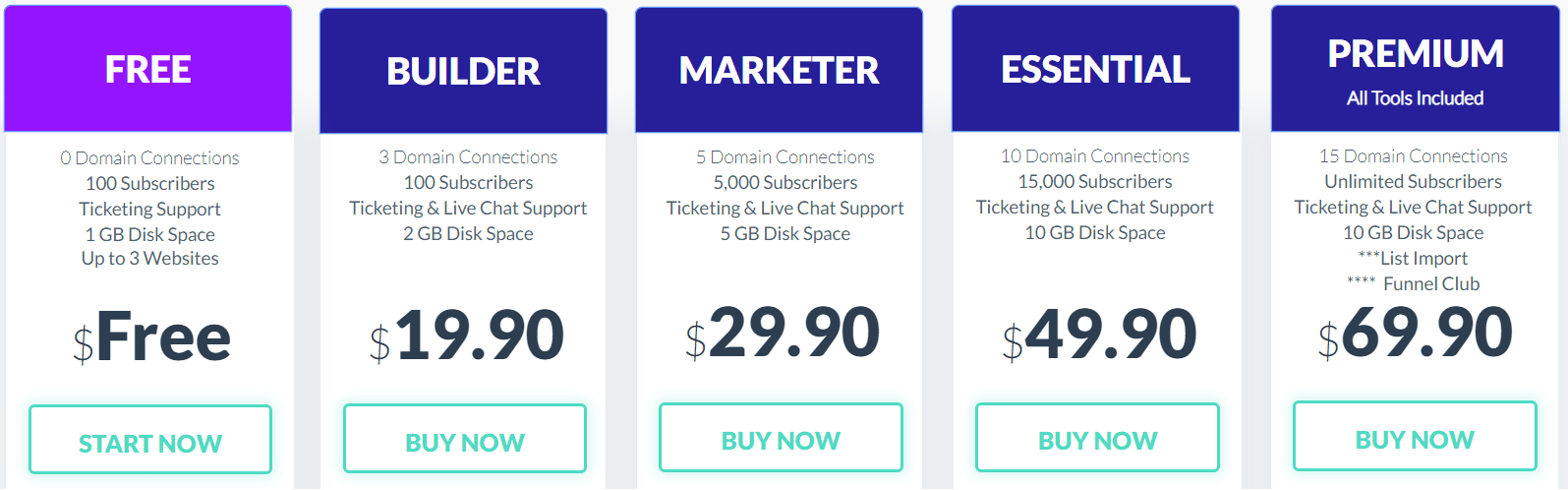
The Builderall pricing plans seem to constantly be changing.
So at the time of writing this, here are the pricing plans that they come with:
- The Builder plan is $19.90 per month.
- The Marketer plan is $29.90 per month.
- The Essential plan is $49.90 per month.
- The Premium plan costs $69.90 per month.
Overall, the Premium plan is going to be the best value for your money.
It also comes along with all of the tools that Builderall features.
I’ll put a related post down below if you’d like more information about the pricing plans.
Highly Related: Builderall pricing plans.
Now onto the last section when it comes to this sales funnel software.
Should you use it, and what are some of the pros and cons of Builderall?
Let’s find out now.
Should You Use Builderall?
Let’s take a look at the pros and cons of Buiderall now.
Builderall Dislikes
- It’s not the easiest sales funnel software to use (but it’s gotten much better).
- Many of the features and tools aren’t needed or you’ll never end up using them.
First things first, Builderall certainly has more features than the other sales funnel builders.
That can definitely be a good thing.
However, by doing that, it takes away from focusing on the biggest aspect of this software:
- The ability to create landing pages.
- The ability to create sales funnels as well.
And sure, why not, also the ability to create websites for your online business as well.
For me, I’ll never be using many of the tools that come along with this software.
That might not be a big deal for you though.
After all, some people like having the ability to choose from a ton of tools at once.
And I can totally understand why.
Lastly, Builderall isn’t going to be the easiest sales funnel software to learn.
Given the fact that there are a ton of features and tools, it also means more to learn.
However, I certainly like the improvements that Builderall has made though.
With that being said, let’s take a look at the pros when it comes to Builderall.
Builderall Likes
- Beneficial affiliate program.
- Increased page loading speeds.
- They now offer a completely free plan.
- The eLearning platform is great for membership sites.
- They offer some of the lowest prices for a sales funnel tool.
- The Funnel Club features quite a few done-for-you funnels.
- Their drag-and-drop builder has gotten much better over the years.
- Script Engage can help you quickly and easily create all of your scripts.
- Their customer service has gotten really quick about answering questions.
Yeah, it’s safe to say that there is still a lot to like about this sales funnel software.
I believe that those bullet-points above describe what I like about Builderall the most.
So if you’d like to try them for yourself?
Check out the link that I added down below where you can get started for free:
So those are 5 of the best sales funnel builder software tools.
It’s great that most of them come with free access or a free trial (one only costs $1).
Let’s wrap things up now before I write any more than I need to 🙂
Best Sales Funnel Builders Conclusion
So there you have it.
Here are 5 of the best sales funnel builders currently on the market:
I hope that this lengthy post helped you find the perfect sales funnel software for you.
Keep in mind that they all come with some sort of trial.
So be sure to try out the sales funnel software that works best for you and your needs.
Let’s take a look at some of the most frequently asked questions about this sales funnel builders.
Frequently Asked Questions About Sales Funnel Builders
I’m going to update this post as more questions come in.
As they do, I’ll be able to answer them and help you get going in the right direction.
Until then, thank you for reading and happy sales funnel building!
About the Author James Canzanella
A former personal trainer who went from unemployment to online business success. He's been marketing since 2012 and (still) enjoys lifting weights, listening to rock music, and relentlessly quoting movie lines.
