
ClickFunnels Order Bump (Tutorial)
Welcome to the ultimate ClickFunnels order bump tutorial.
I’m glad you stopped by, seriously.
The order bump is one of the BEST ways to increase your revenue using ClickFunnels…
And it is very easy to implement, too.
So here is what I will be covering in this ClickFunnels tutorial
- What’s an order bump?
- How to set up your ClickFunnels order bump.
- How to remove the order bump in case you don’t want to use it.
And I’ll even be showing you something very helpful when we finish…
So make sure that you read all the way until the end.
Time to begin now.
ClickFunnels Order Bump: Here’s The Benefit
Out of all of the features that come along with ClickFunnels, this is my favorite.
It’s a simple box that you add on the bottom of your ClickFunnels shopping cart.
It allows your customers:
- To purchase another offer from you…
- And do it by simply checking off a box.
Here is a picture of an order bump that I used in the past (33% of people took it):
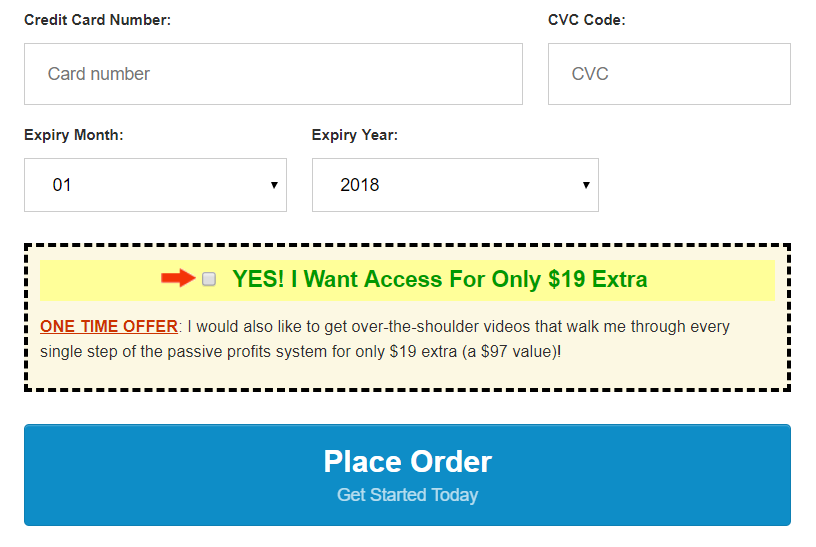
The order bump is everything that is included in the dotted box above the Place Order button.
This feature is so good, that it could possibly pay for the monthly ClickFunnels pricing all by itself.
So now that you and the ClickFunnels order bump have been properly acquainted?
Let’s show you how to get up and running with it.
Setting Up Your Order Bump Part 1
So no steps are going to be left out.
Which means that the first one of going to up to you:
So now you should be logged in and at the dashboard part of ClickFunnels.
- Look at the top of the page.
- Hover over the ClickFunnels tab and then click on Funnels.
And now you should be on the list of your sales funnels.
- Select the funnel that you’d like to add an order bump to.
- Or you can create a new funnel by using the Add New button.
For this tutorial, I am creating a funnel from scratch.
And to do that?
Here were the steps I followed:
- Click on the + Add New yellow button.
- Then click on + Create New Funnel button.
- Click on + Choose which is under Sell Your Product.
- Then click on + Choose under Sales Funnel and give it a name.
Here is where I am now (picture for guidance):
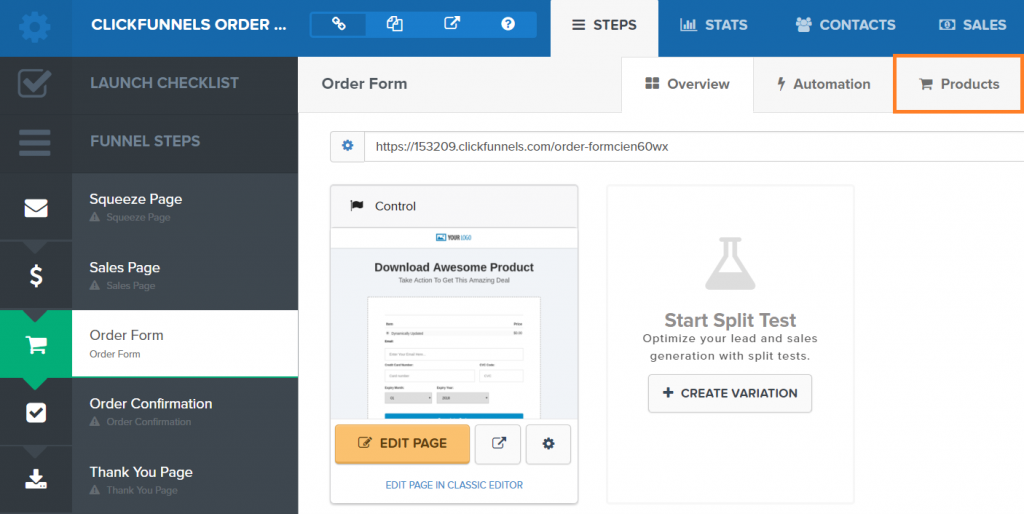
Note: Don’t mind the Products tab being highlighted as that’s for later.
Now look to the left side of the screen.
- Click on the Order Form step tab.
- Choose an order form template that you happen to like.
There are many of them, but I like going with something simple like the Skinny Order Form.
Now we need to add in your product details before we make any modifications.
Let’s include your product info before we modify your page.
Make sure that you are still on the Order Form tab in your funnel:
- Click the Products tab.
- Click on + Add Product.
Note: Look at the picture above to see where the Products tab is.
The next step is up to you which is filling in the correct information.
But on the second page, do you see the box that says?
Should this product be the bump on the order page if present?
Important: Make sure that you enable this!
Another picture for you down below so that you don’t miss this part:

Then just simply keep filling your information until you get back to your funnel steps.
And one thing to keep in mind before we continue:
- You need to have one regular product on your secure order page.
- Membership type products aren’t allowed as order bumps (maybe sometime later though).
So that is how you set up the order bump outside of your secure checkout page.
Here is the next step when it comes to setting it up on your page.
Setting Up Your Order Bump Part 2
It’s time to edit your secure checkout page (along with order bump).
Make sure that you are on the Order Form tab and click on EDIT PAGE.
This will take you to the ClickFunnels editor and here is what you need to do:
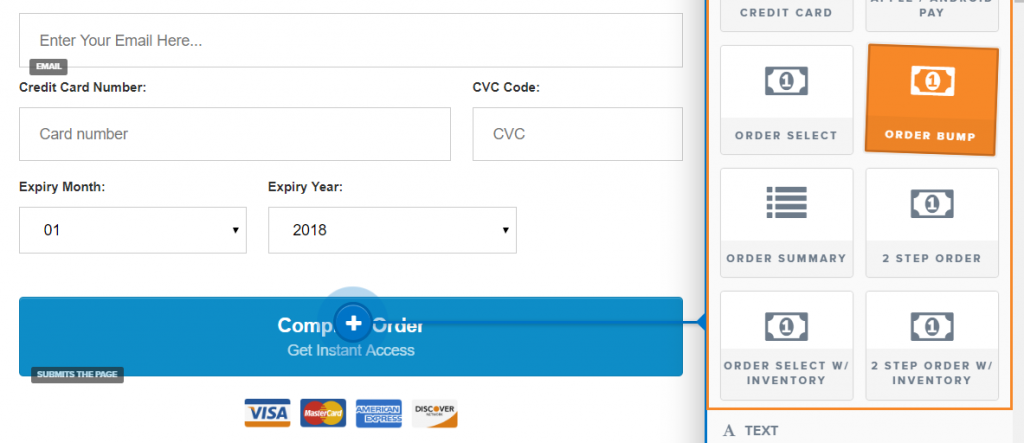
- Hover your mouse over ELEMENTS at the top of the page and click ADD ELEMENT.
- Drag the Order Bump section to your order form (wherever you want to put it).
Here’s a photo (remember, you drag the Order Bump button into your page):
Editing the text is pretty easy, too.
Move your mouse and hover over the form until you see the SETTINGS gear.
Click it.
This will allow you to make the changes that include:
- The heading of the order bump.
- The OTO heading and text.
- And even the font.
Heck, you can even change the colors if you like.
And that is EXACTLY how you setup your high-converting order bump.
I really hope that you put this feature into good use so that you can make more sales.
This feature is so good that many sales funnel platforms have also started using it as well.
And just in case you need a little bit more information?
Here is a great video that walks you through the process of using an order bump.
Step By Step Tutorial Video
- Maybe you like reading.
- Maybe you’re like me and prefer watching videos.
That’s why I decided to give you the best of both worlds.
Feel free to check out the video down below if you’d like to see these steps in a video:
And here is one question I would like to address and answer before the end:
How do you exclude order bumps on ClickFunnels?
It’s super easy.
Please see the image I placed below:

When you hover over your order bump?
Simply just click on the trash can icon.
That’s all, seriously!
That is how you get rid of the order bump (if for some reason you wanted to ditch it).
Now let’s move onto the end (the very best part).
The ClickFunnels Order Bump Conclusion
I want to say thank you for taking the time out of your day to read this post.
You should now know everything when it comes to getting your order bumps up and running.
And since you are a current ClickFunnels user?
I recommend that you check out the helpful link at the bottom of this page.
It can show you how to save a lot of money when it comes to using ClickFunnels.
So I’ll leave you to that.
Must Read: Saving up to $594 with the ClickFunnels annual plan.
Thanks again for stopping by and have a great day.
About the Author James Canzanella
A former personal trainer who went from unemployment to online business success. He's been marketing since 2012 and (still) enjoys lifting weights, listening to rock music, and relentlessly quoting movie lines.
