
EverWebinar Review 4.0: Is This Webinar Software Worth It?
I’m glad that you happen to stumble upon this EverWebinar review.
Not only should you consider yourself in the right spot…
But I believe that this in-depth review will really help you out when getting started.
Let’s take a look at what this automated webinar software has to offer.
EverWebinar Review: Introduction For This Webinar Platform

No more live webinar presentations like this gal
The best part about this review is that I’m going to walk you through the new EverWebinar 4.0.
This will help you out in 2 ways:
- Get an overall review of this webinar software tool, and also…
- Get a walkthrough (so that you can come back to this post after you get started).
You’ll get plenty of my tips when it comes to automated webinars, too.
I’ll put the link to the EverWebinar home page in case you’d like to follow along now:
And yes, you read that right.
The link above allows you to get a trial for sixty days as opposed to only fourteen days.
Important: Keep in mind that the special webinar trial duration won’t last forever.
So I would recommend checking the link above to see if it’s still available.
Now let’s get right into the magic that Andy Jenkins of Genesis Digital once created.
Sad Note: Andy Jenkins passed away not too long ago (may he rest in peace).
EverWebinar Software Configuration
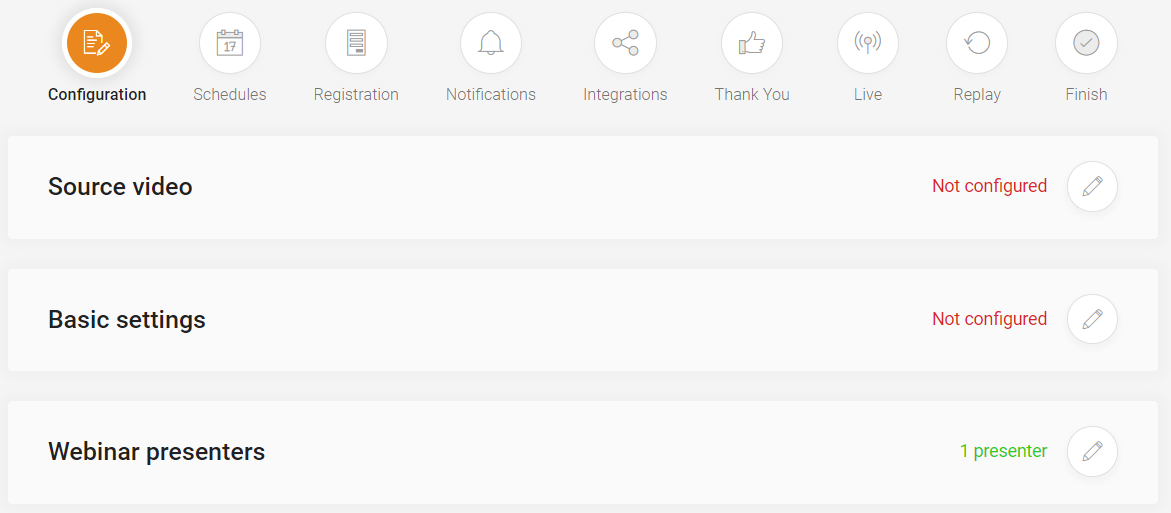
This is the first step that comes along with creating automated webinars.
You pretty much need to:
- Add your webinar video that you want to be played around the clock.
- Edit the settings of the video
Keep in mind that the source webinar video can come from one of 2 spots:
- One of the previous WebinarJam live webinars.
- Or an external webinar video file.
Note: External video means an MP4 file, Amazon S3, Vimeo Pro, or even a YouTube link.
Another Note: WebinarJam is the live webinar/live event platform.
So YES!
You can simply take one video link from YouTube and paste it in that section.
Which is really helpful.
Everything else in this section is self-explanatory but let me give you one little expert tip.
When it comes to the Basic settings section?
Check off the Yes, list it in our On-Demand section.
As that can help you get more traffic, viewers, and ultimately sales for your webinars (and it’s free).
So far so good right?
Let’s move onto the next automated EverWebinar section.
EverWebinar “Just In Time” Schedule
There’s a lot of great options that you can choose from when it comes to webinar schedules.
Let’s take a look at a few.
First of all, you can choose by series (which is new):
- On specific days (choose days in the calendar).
- Or on every day (or you can include specific days like Monday, Tuesday, etc).
Note: You can see that down below in the image next to the NEW series block.
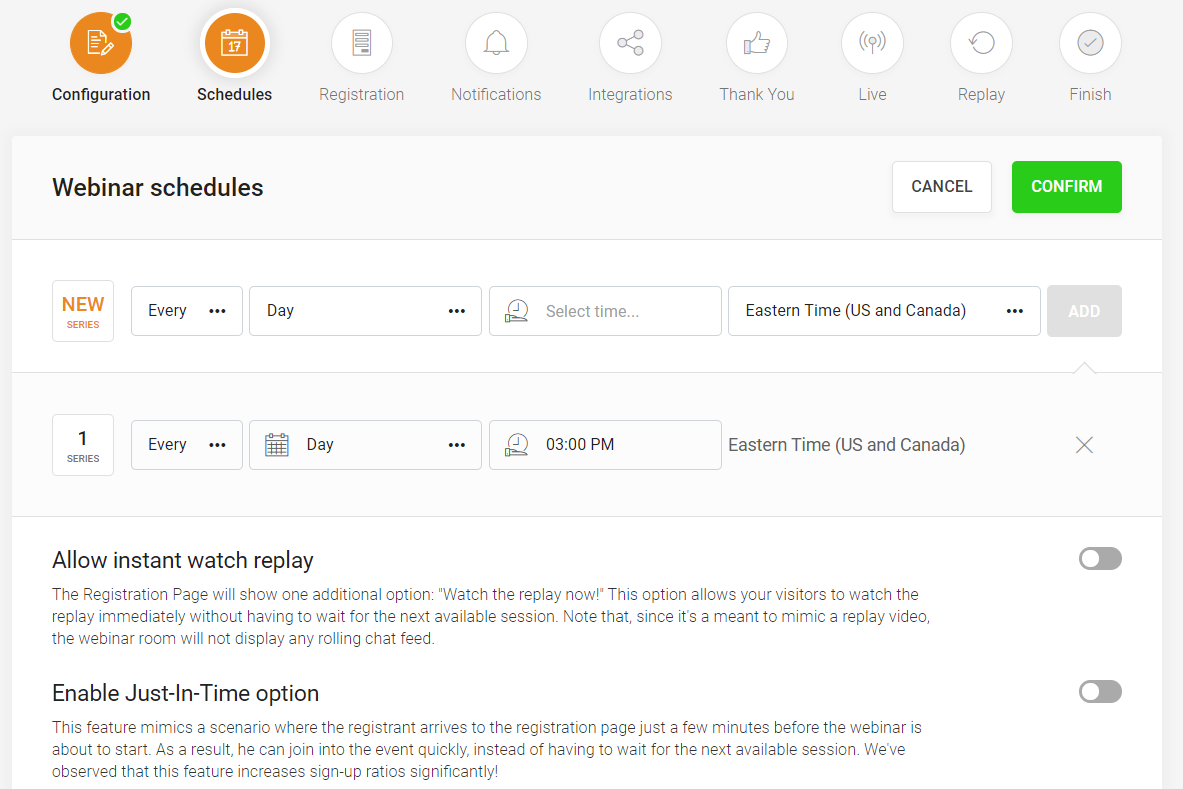
You can also customize the time as well as the time zone (I chose Eastern since I’m in Florida).
It’s overall very flexible and there are even 2 more excellent options to choose from.
- Allow Instant Watch Replay
So when someone arrives on your webinar registration page?
They can choose to watch the replay immediately as opposed to waiting for a specific time.
- EverWebinar Just In Time Option
What makes this option so powerful is that you can pretty much just utilize this…
So that your webinar runs on:
- Every :00
- Every :30 or :00 or
- Every :15 or :30 or :45 or :00
Everything is 100% customizable to you (it’s up to you how you make your webinar).
Heck, you can even set dates (like holidays) where you don’t want your webinar to run.
After all.
Most people aren’t going to be running (or watching) webinars on big holidays.
So that’s just an example of the webinar customization that you can do when it comes to Schedules.
Onto the next automated webinar section.
EverWebinar Templates
This section is about having your potential customers register for your webinar…
Where all they need to do is give you their email address (and name as well).
I also wanted to address what you can do when it comes to landing pages and templates.
Here is an example of a screenshot from where you can select your registration template:
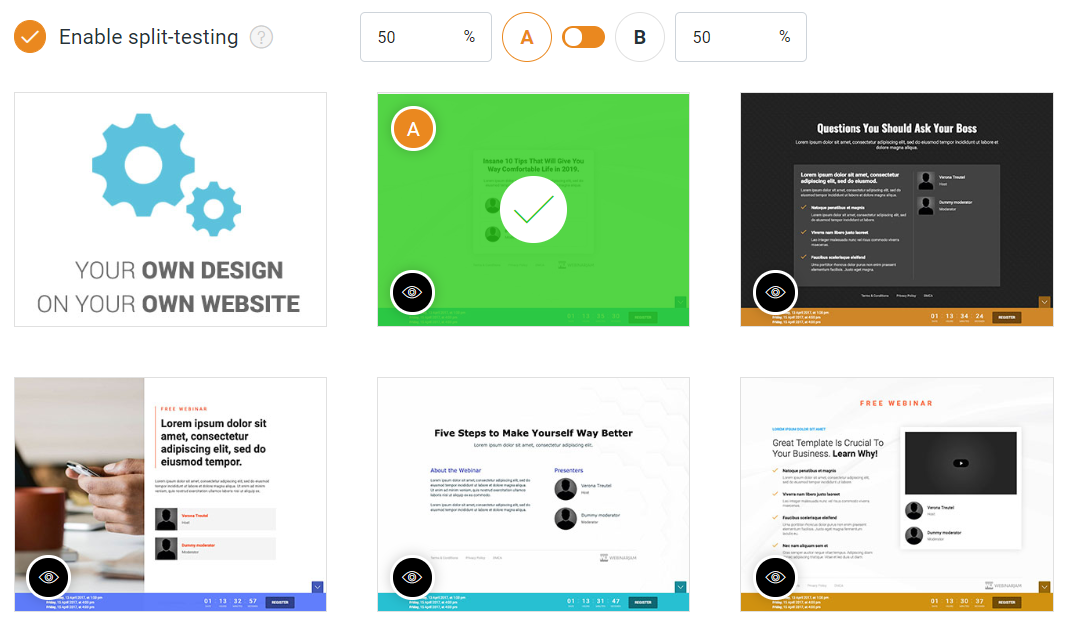
So do registration pages come with some of the best templates you’ve ever seen?
Probably not.
However, what matters most if how well the landing pages convert (and not how well they look).
So from all of my testing?
The highest-converting webinar pages are about as simple as possible…
And most of the EverWebinar templates that you get are as simple as can be.
- Pro Tip 1: Just focus on getting that email address.
- Pro Tip 2: Quality over quantity (as you already know).
Plus, don’t forget that you can:
- Customize all of the registration pages.
- Or you can even create your own from scratch (shown in the top left of the picture above).
They can be split-tested too.
Let me address this question too since we’re on this topic.
How To Run An EverWebinar Split Test?
Here are the steps:
- Toggle on the AB test option (shown above in the picture).
- Choose the two registration pages that you want to split test.
- Distribute the traffic evenly between both pages (I prefer a 50-50 split).
That will allow you to (easily) see which registration page converts the best.
And like I said before (if you really want to increase your conversions)?
Keep your webinar registration pages as simple as possible.
Alright.
Now onto the next section of EverWebinar.
EverWebinar Email Notifications
This is all about sending emails to help get more potential customers attending your webinar.
Just So You Know: These are also referred to as email reminders.
This section is important.
- The more people that attend your webinar.
- Ultimately, the more sales that you can make (which is what you want).
Here is a screenshot to give you a great idea of what this area looks like:
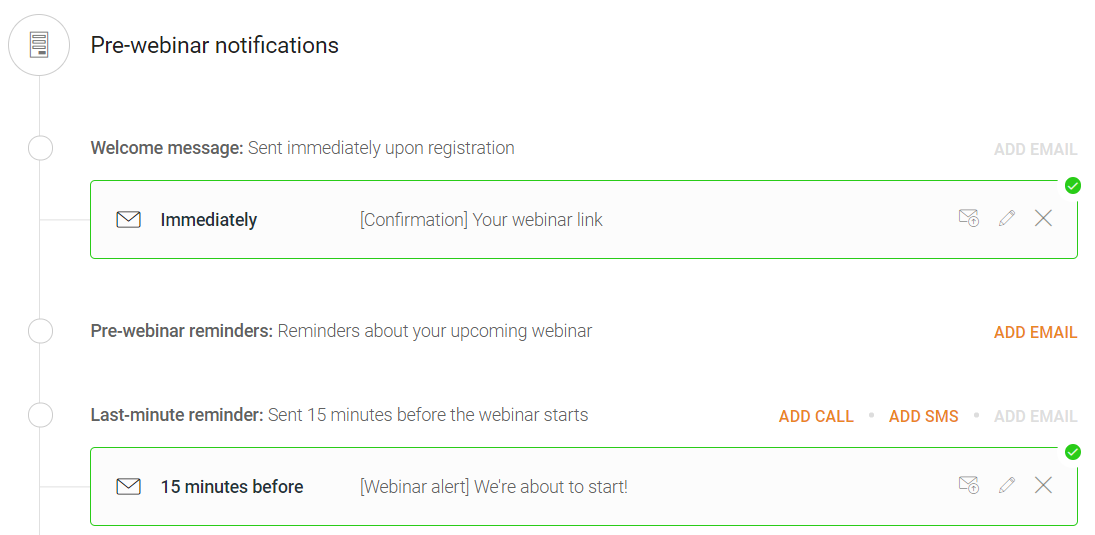
As you can see from the image above, you have pre-webinar notifications which include:
- Sending immediately (once someone signs up).
- Another reminder that can be X hours before it starts.
- And lastly is going to be one more reminder that is 15 minutes before.
I recommend that you use the Immediately and 15 minutes before reminders.
There is also the option for post-webinar notifications via email.
Note: It’s not in the image above as I didn’t want to make it too big.
Here is the option that you have when it comes to post-webinar notifications:
- Telling them about the replay which can be sent X hours after the webinar finishes.
All of these are great ways to get more people to watch your webinar presentation.
Right now you might be wondering what EverWebinar integrates with.
And if so, it’s your lucky day because that is the next step in the webinar creation process.
EverWebinar Integrations
As you can see from the image above…
These are the EverWebinar email integrations (so your email marketing needs are covered).
It’s simple to integrate too.
For example, with GetResponse, you pretty much just add in your API Key.
With EverWebinar you can also integrate with 3rd party tracking.
Just in case you’d like to really get a better look at just how well your webinar performs.
Continuing on with this best webinar review article.
EverWebinar Thank You Page
Here is the page that they arrive on after registering for your webinar.
The process, once again, is quick and easy to setup.
Here is a look at some of the templates that you can choose from:
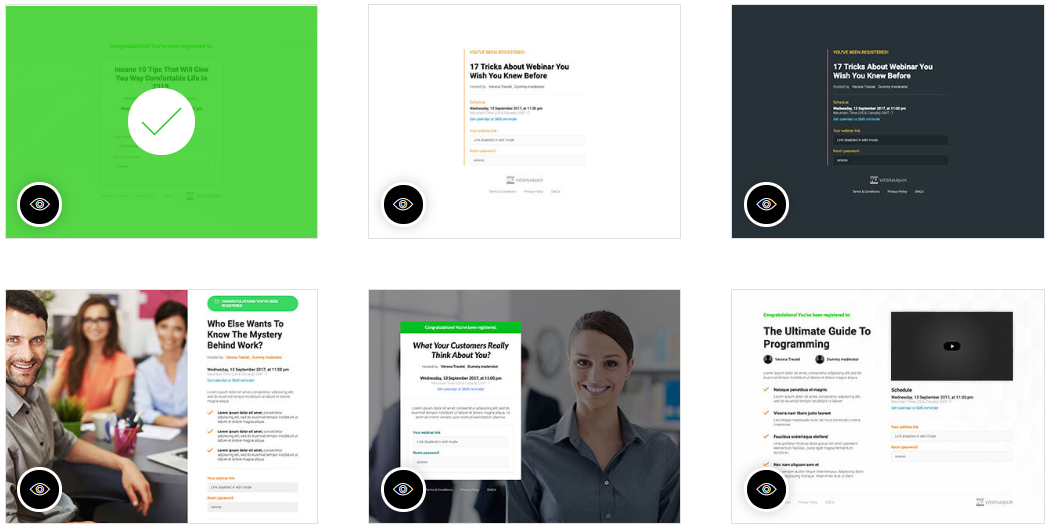
Every single one of these templates is customizable.
You can even survey your visitors (that would be up to you).
The next section refers to features related to live webinars.
This is despite the fact that EverWebinar is all about creating an automated webinar.
Related Reading: The differences between automated and live webinars.
Let’s get right on into it the “live webinar” section.
EverWebinar Live
Despite the fact that EverWebinar is for playing automated webinars…
The live webinars aspect refers to everything you see when the presentation is being played.
Here are the helpful software aspects of this section (in my opinion).
Room Design
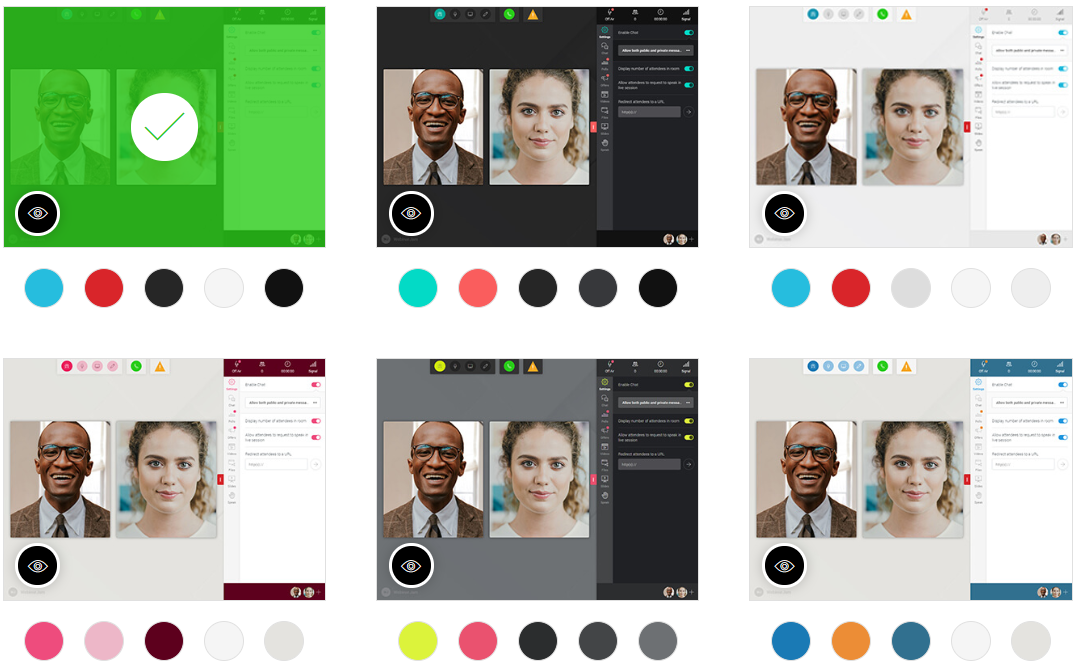
So (at the time of writing this) you have 6 options to choose from.
While they aren’t customizable…
I think that they’ve done a great job when it comes to having multiple solid options to pick from.
Live Chat Box
Is it real or is it EverWebinar?
One of the popular taglines when it comes to this software tool (thanks to this feature).
Here are the options when it comes to setting up this feature (as shown in the picture below):
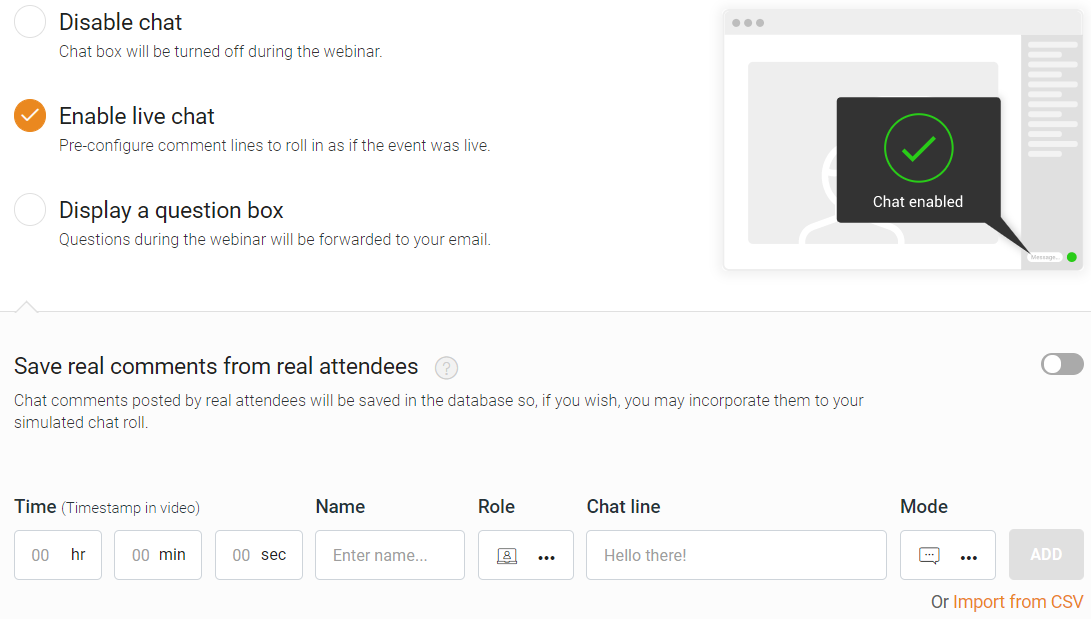
So allow me to explain your options:
- Disable chat means no chat whatsoever.
- Enable live chat which means pre-configured comments come in as you present.
- And last but not least, you can display a question box where people can send you their questions.
Here is the strategy that I recommend:
- Enable live chat.
- Have people chat while the presentation runs.
- Those chats get saved so that you can keep incorporating them in the future.
So the more you run your webinar?
The more you’ll be able to build up the real conversation in the chat-box.
Plus, it’s great social proof when customers talk about how excited they are.
Product Offer
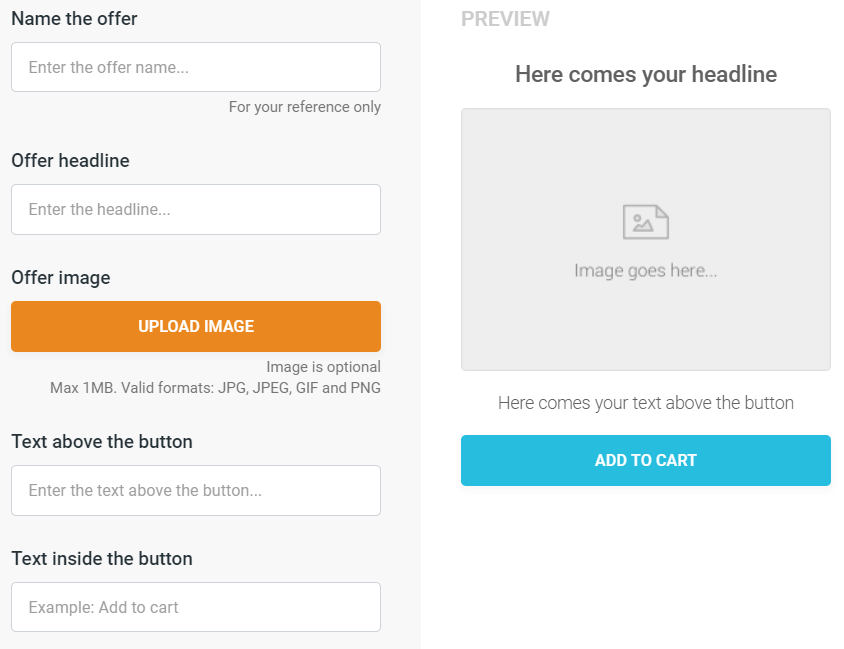
If you’re going to be selling a product, then this is something that you definitely want to use.
The steps for this are pretty much self-explanatory:
- The name.
- The headline of the offer.
- Image (a nice cover box will do).
- Insert some text above the button like, Get Started Today.
- The text inside the button, for example, Add To Cart as shown.
And you can also edit when the product offer starts and ends…
Along with being able to add a countdown if you want to utilize some more urgency.
Now.
There are many other functions that you can edit in this section which include:
- Quizzes and polls.
- Highlighted announcements.
- You can display the number of “live” attendees.
- You can redirect your audience to an external website.
- There’s a notification for live sales which can help increase conversions.
- And last but certainly not least, would be the ability to add file handouts.
They are all beneficial in their own way…
But the instructions are very easy when it comes to setting these up (if needed).
Only one more section when it comes to getting your automated webinar up and running.
Here it is.
EverWebinar Replay Recording
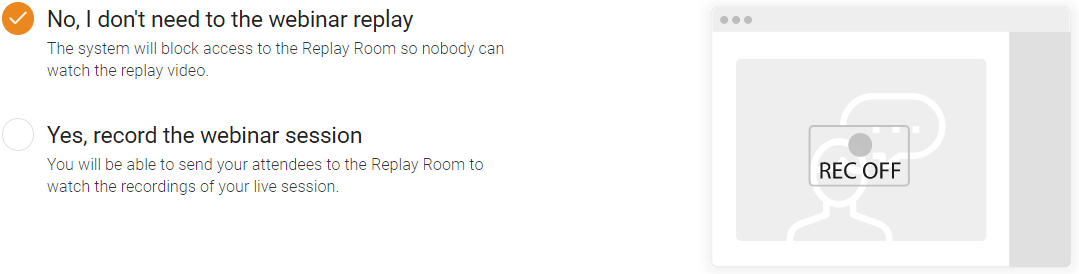
Here are your options when it comes to this:
- You can block the webinar replay.
- Or you can keep it so that attendees can see the replay later.
I recommend that you keep it around…
As it’s only going to help when it comes to getting more attendees and sales.
That’s actually the final step when it comes to creating your automated webinars…
So let’s wrap up this EverWebinar walkthrough review and get to the end.
EverWebinar Review Conclusion

I’m sure, that by now, you can tell just how much I like this software for automated webinars.
Here are the quick cliff notes when it comes to the pros and cons of this webinar software.
Pros
- Easy to use.
- The webinars look and feel real.
- Split testing is helpful and easy to setup.
- Training and support are both helpful if needed.
- This tool pays for itself and much more (more info here).
- Analytics is great for seeing how well your webinar converts.
- Setting up your evergreen webinar is a pretty quick and easy process.
- They have plenty of bells and whistles to help increase your conversions.
Cons
- More integrations could be helpful.
And honestly?
I’ve never had any major problems when it comes to this automated webinar software tool.
EverWebinar does exactly what it says it’s going to do (and that’s a very big plus).
Business owners rejoice, as this evergreen webinar software gets two big thumbs up!
EverWebinar Sign Up
So I hope that this in-depth review article does two things for you:
- It helps you make a choice when it comes to getting started.
- It helps you get your 1st automated webinar up and running quicker by following along.
I truly think that you’ll like what you see when it comes to getting started.
If you give the link down below one click, you can get a trial for this automated webinar platform:
That will give you plenty of time to get your automated webinar up (and even making sales).
And if you need help with getting signed up you can read the related post below:
Related: Getting started with EverWebinar.
Thanks again for stopping by and reading this in-depth automated webinar blog post.
I know that there are probably a few other EverWebinar reviews…
But I’m glad you took the time out of your day to read this EverWebinar review article.
Thanks again…
And I hope that you enjoy creating automated webinars just as much as I did when I first got it.
Other Reading: My WebinarJam review.
About the Author James Canzanella
A former personal trainer who went from unemployment to online business success. He's been marketing since 2012 and (still) enjoys lifting weights, listening to rock music, and relentlessly quoting movie lines.
