
GetResponse Vs ConvertKit
GetResponse vs ConvertKit features two of my favorite email marketing tools.
Seriously.
Both of these software tools have a lot going on for them…
So I can see why you’d be interested in finding out who will be best for you.
Be sure to keep reading on to find out.
GetResponse Vs ConvertKit Introduction

So what I’m going to do is start by talking a little bit about what ConvertKit:
- What they have to offer.
- Some of their biggest benefits.
- And of course, how much they cost per month.
Then I’ll be flipping the script and doing the same with GetResponse…
And the grand finale will be where I give you my opinion about which tool is best.
So without any further ado?
Let’s begin.
About ConvertKit

This email marketing tool was first launched back in March 2013…
And is considered a solid choice for email marketing especially when it comes to:
- Sequencing.
- Automation.
They also come with a free trial where you can test them out for 30 full days.
Now onto some of their most powerful features.
ConvertKit Visual Automations
As stated by ConvertKit themselves, this allows you to:
Build your entire marketing workflow in one simple screen.
ConvertKit also states that:
You’ve never seen a marketing tool this easy to use.
I’d have to agree.
Aside from the powerful features, ConverKit is pretty simple to get things running.
Here is an example of what it looks like when creating new automation:
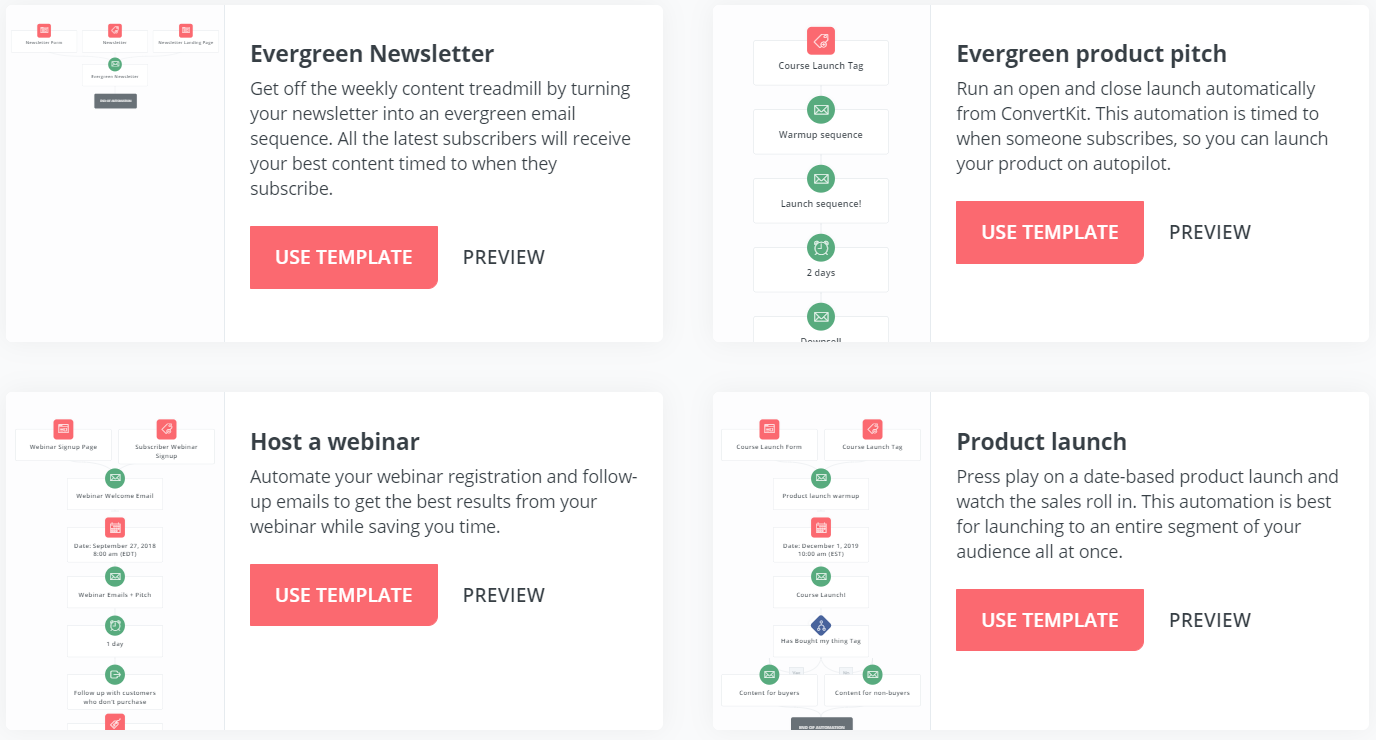
As you can see above, ConvertKit allows you to use templates…
And if there’s anything that I love about any type of software?
It’s the ability to use templates because they allow you to get up and running faster.
On the other hand?
You can always start from scratch and create automation paths the exact way you had in mind.
At the end of the day though, the idea behind visual automations are to:
- Help send the right message, to the right person, at the right time…
- Which then will allow you to make more sales.
In fact.
There’s even an automation template that’s for following up with those who didn’t purchase.
That automation by itself is a great way to give individuals more incentive to purchase.
ConvertKit Sequences
Sequences is another fancy way to say email marketing follow-ups.
Or in other words?
They are an automated series of emails.

Using the sequences feature is pretty simple, too.
Here are the steps that you’ll generally go through when getting started:
- Choose when you’d like your email to be sent out.
- Create your high-click-through-rate subject line.
- Write out your email in the Content box.
- Repeat the process with the next email.
While you can’t see it in the screenshot picture above…
There’s also a Reports sections which are helpful if you’re a stats person.
- Click rate.
- Open rate.
- Sends and unsubscribes.
This is a great way to see how your emails are performing.
But that’s the ConvertKit sequencing section which is, yet again, pretty easy to figure out.
ConvertKit also comes along with features that include:
- Broadcasts (which is pretty much almost email marketing tool).
- Landing pages and forms (in case you need them).
- And a bunch more.
And since I mentioned landing pages?
Here is an example of a few ConvertKit landing page templates for you:

If you’d like to read a little bit more about what ConvertKit has to offer?
Then be sure to check out another IMNights article down below:
Related ConvertKit Post: Check out my ConvertKit review.
Now onto one of the most popular questions when it comes to an email marketing tool.
How Much Is ConvertKit?
It’s pretty straightforward when it comes to the plans.
Here they are:
- $29 per month for up to 1,000 subscribers.
- $49 per month for up to 3,000 subscribers.
- $79 per month for up to 5,000 subscribers.
Keep in mind that it can change based upon if you pay monthly or annually.
There’s more information about that and the savings in the post down below:
Related Post: Getting a discount from the ConvertKit pricing plans.
So that’s ConvertKit in a nutshell.
I’d define this email marketing tool as being both:
- Simple to use.
- Yet advanced in automation.
That’s always a good place to be when it comes to sending emails.
And if you need help with the signup process?
Check out the related post below.
Related Post: Get walked through the ConvertKit free trial process.
So now that we’ve got the important stuff out of the way…
Time for the other alternative when it comes to the GetResponse vs ConvertKit battle.
About GetResponse

Compared to ConvertKit?
GetResponse would be the grizzled veterans given the fact that they’ve been around since 1998.
In other words?
They know how to do email marketing right.
Similar to ConvertKit, they also come with a free thirty-day trial as well:
Let’s talk a little bit about some of their powerful features as well.
GetResponse Email Marketing
You just can’t go wrong when it comes to utilizing GetResponse for email marketing.
Their simplicity certainly shines when it comes to either:
GetResponse can certainly hold its own when it comes to email marketing.
- Using their autoresponder features.
- Or simply sending broadcasts.
Similar to ConvertKit’s sequences feature?
Completing your very-own autoresponder sequence is also a breeze.
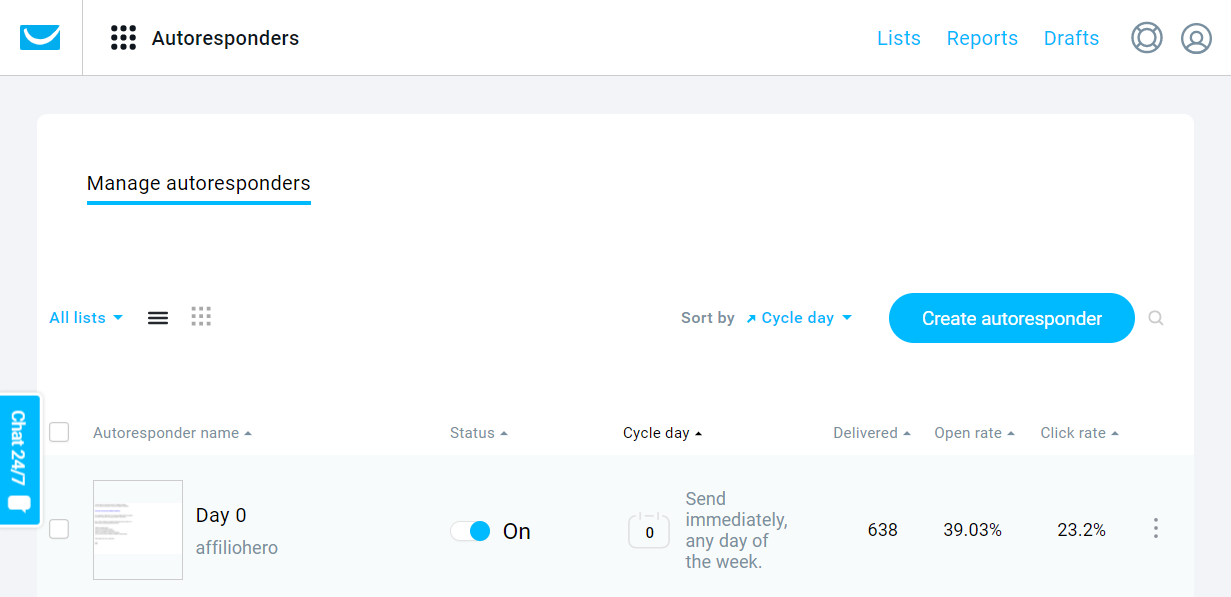
Regardless of which autoresponder I’ve tested out or used in the past?
I’ve always loved the autoresponder features simply because it saves you a ton of time.
- Just write your emails.
- Insert them into your series.
- Then GetResponse does all of the heavy-lifting and sends them out on time.
Down below is an example of what it looks like in the GetResponse email editor:
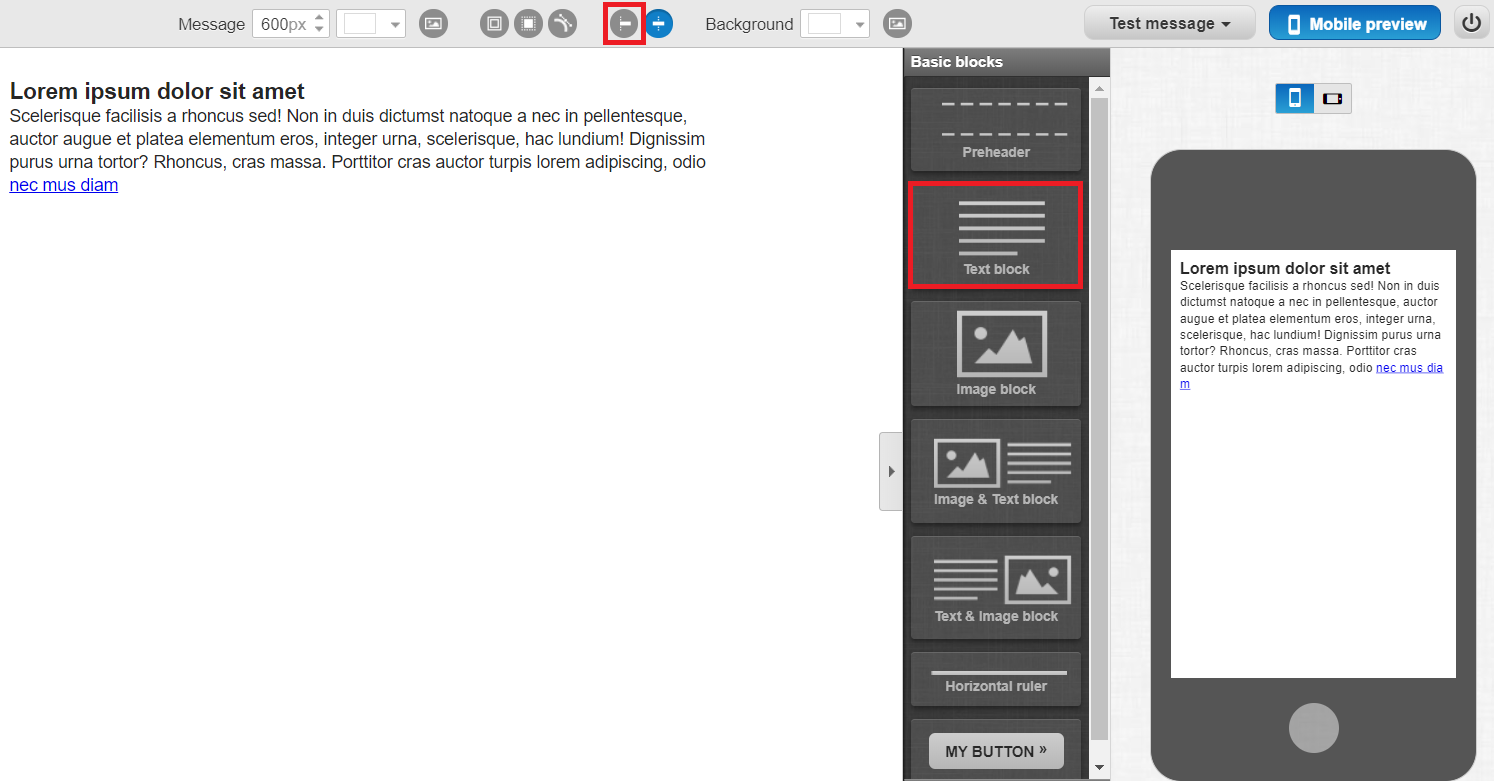
There are only a few steps that you need to take when it comes to writing an email:
- Slide the text box that you’d like to use in the blank space.
- Write your email in the text box that you brought over.
- Choose when you’d like your email sent out.
And on a side note?
GetResponse also features the Perfect Timing setting for sending out your emails.
This helps you get much better engagement including:
- Opens.
- Link clicks.
- And of course sales.
So that was a general overview when it comes to sending emails with GetResponse.
The autoresponder feature is, by far, my favorite part of this tool.
Let’s move onto what else GetResponse has to offer aside from sending emails.
GetResponse Landing Pages
Given the fact that I talked about ConvertKit having a few landing pages templates…
I’m going to also let you know that GetResponse has quite a few more templates themselves.
In fact.
They have well over one-hundred templates to choose from and you can see a few down below:
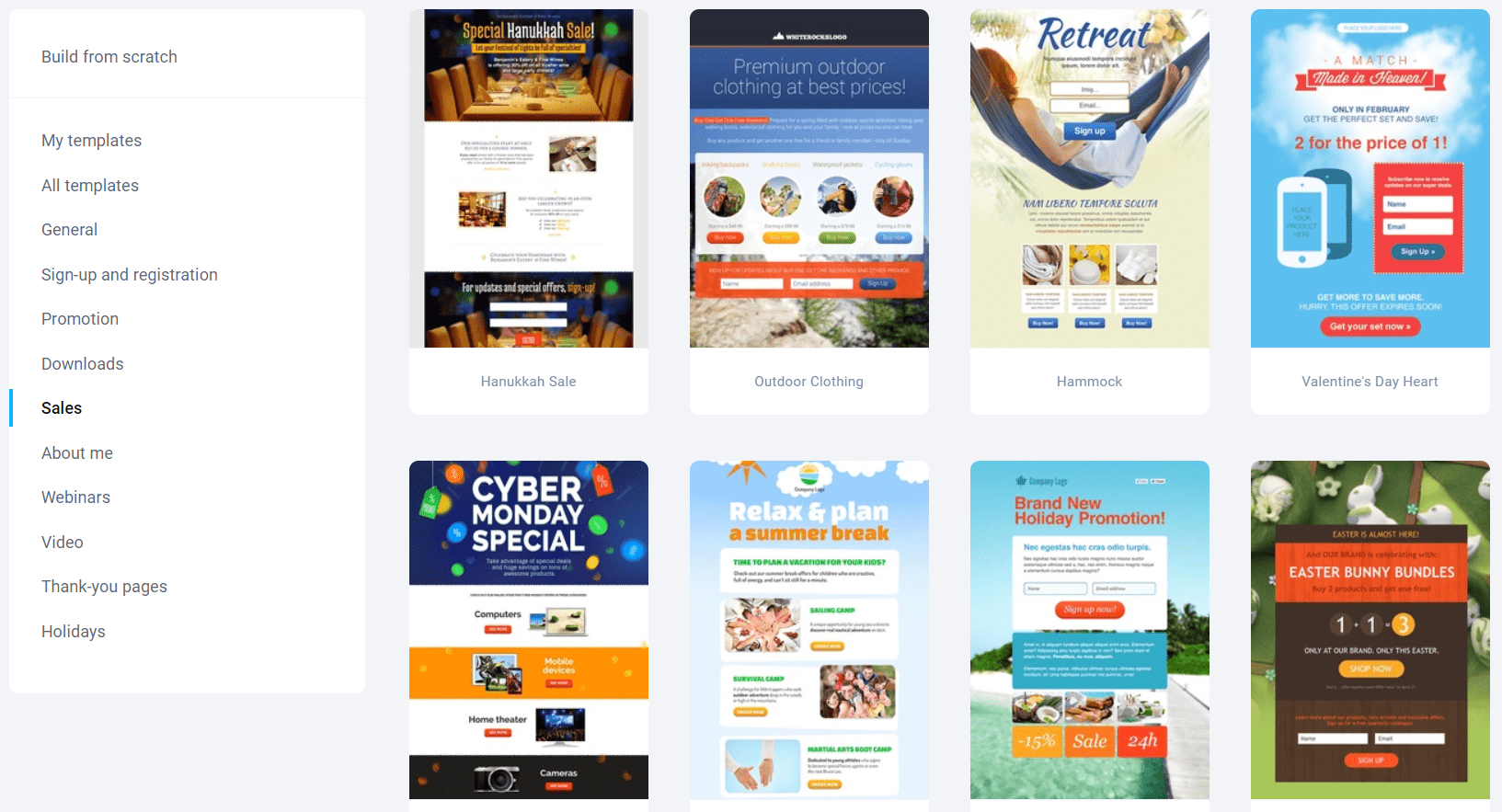
Or you can just create a landing page from scratch.
Now.
I’m not big on using email marketing tools for landing pages…
But at least it’s a nice feature to having seeing there will be people who want that.
Let’s look at one more non-email related feature that GetResponse has.
GetResponse Autofunnels
What’s better than landing pages? Being able to create full sales funnels.
But once again.
I wouldn’t personally use GetResponse just to create funnels (it’s cool to have though).
Down below is an example of a two-step sales funnel that you can create with GetResponse:
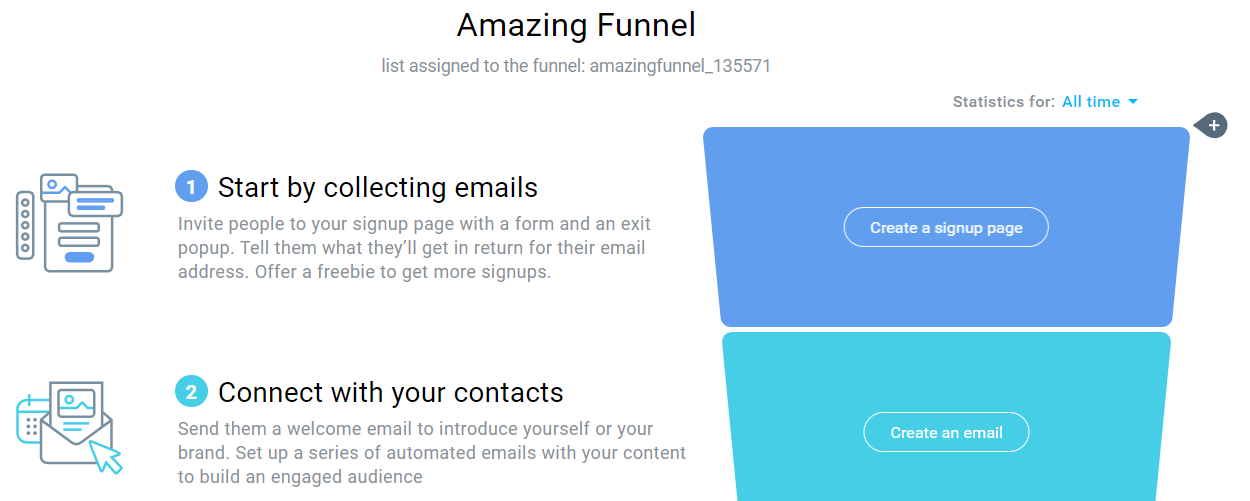
To be fair, their autofunnels aren’t exactly challenging when it comes to using:
- Collect your emails.
- Connect with your subscribers.
It’s not exactly rocket science, but it certainly can be beneficial to have.
Let’s look at one more big question when it comes to using GetResponse.
How Much Is GetResponse?
The cost of GetResponse can change depending on how many emails you have.
As an example.
Here is what you’d be looking to invest in terms of the first (Basic) plan that they have:
- $15 per month for up to 1,000 subscribers.
- $25 per month for up to 2,500 subscribers.
- $45 per month for up to 5,000 subscribers.
- $65 per month for up to 10,000 subscribers.
- $145 per month for up to 25,000 subscribers.
- $250 per month for up to 50,000 subscribers.
GetResponse also comes along with more plans to choose from (along with better perks).
You can check out that complete post below.
Related Reading: All of the GetResponse pricing plans revealed.
And that’s what GetResponse has to offer.
I recommend that you test them out to see just how much you like them.
Just click on the big picture down below to get your complimentary trial:

Whew.
That was a good amount of content when it comes to ConvertKit vs GetResponse.
Let’s get to the end of this post and decide who will be the best pick for you.
GetResponse Vs ConvertKit Conclusion

GetResponse is the grizzled veteran focused on simplicity and dazzling extra features.
ConvertKit is relatively newer and focusing on automation and segmentation.
Given the fact that both of these tools are amazing autoresponders?
Here is my recommendation for you:
Use GetResponse If
- You’re newer and need to start making sales.
- You like the ability to create landing pages and sales funnels.
- You want an email marketing tool with a long and proven track record.
If any of those above sound like you?
And on the other hand.
Use ConvertKit If
- You’re looking to ramp up your sales.
- Paying a little bit more isn’t a big deal for you.
- You want more advanced segmenting and automation features.
And if any of those above sound like you?
And that should do it.
All in all.
You can’t go wrong with either tool as they’re both excellent at what they do.
I want to say thank you for taking the time to read this GetResponse vs ConvertKit article.
Regardless of which email marketing tool you go with?
I truly hope that it helps you get more opens, clicks, and most importantly sales.
Related: The ConvertKit vs Mailchimp battle.
About the Author James Canzanella
A former personal trainer who went from unemployment to online business success. He's been marketing since 2012 and (still) enjoys lifting weights, listening to rock music, and relentlessly quoting movie lines.
