
Landingi Vs Unbounce: Comparing Software
Imagine picking the best software when it comes to the battle of Landingi vs Unbounce.
It would be pretty great, right?
Just think of the big benefits that come from picking the perfect marketing tool:
- There would be a lot less stress.
- You wouldn’t need to invest in many other software tools.
- And your marketing could be more much powerful and effective.
Picking the right software is pretty important.
That’s why I want to help you pick the tool that’s going to be the very best for you.
So let’s get this show on the road.
Landingi Vs Unbounce: Video Introduction
First things first, I wanted to give you the cliff notes when it comes to this topic.
I created a video in case you’d rather hear me talk about comparing these tools.
Just click on the play button to get a comparison of Unbounce vs Landingi:
Now here are some of the popular features when it comes to Unbounce and Landingi.
Landingi
$29/month
- 10 popups
- 100,000 visitors a month
- Unlimited landing pages
Unbounce
$99/month
- 8 popups and sticky bars
- 500,000 visitors a month
- 75 published landing pages
Note: These are just the lowest-priced options for both software tools.
I’ll be talking more about their prices, perks, and features as we continue on.
Now I want to compare one of the biggest features of Landingi and Unbounce.
Landingi Vs Unbounce: Landing Pages Compared
Whether you end up using:
- Landingi (or).
- Unbounce.
There’s no doubt about it that you’re going to be creating some high-converting landing pages.
That’s why I want to focus on this feature the most.
Both Landingi and Unbounce have their pros and cons when it comes to creating landing pages.
I’m going to start with Landingi first and walk you through the process of creating a landing page.
Landingi Landing Pages (How To Create Them)

So here’s the great news right off of the bat when it comes to Landingi:
Creating a landing page with them is a really easy process.
I’m also going to be walking you through the process as well.
You will need to first pick out a template (like many landing page builders).
I think that you’ll like the fact that they have many great landing page templates to choose from.
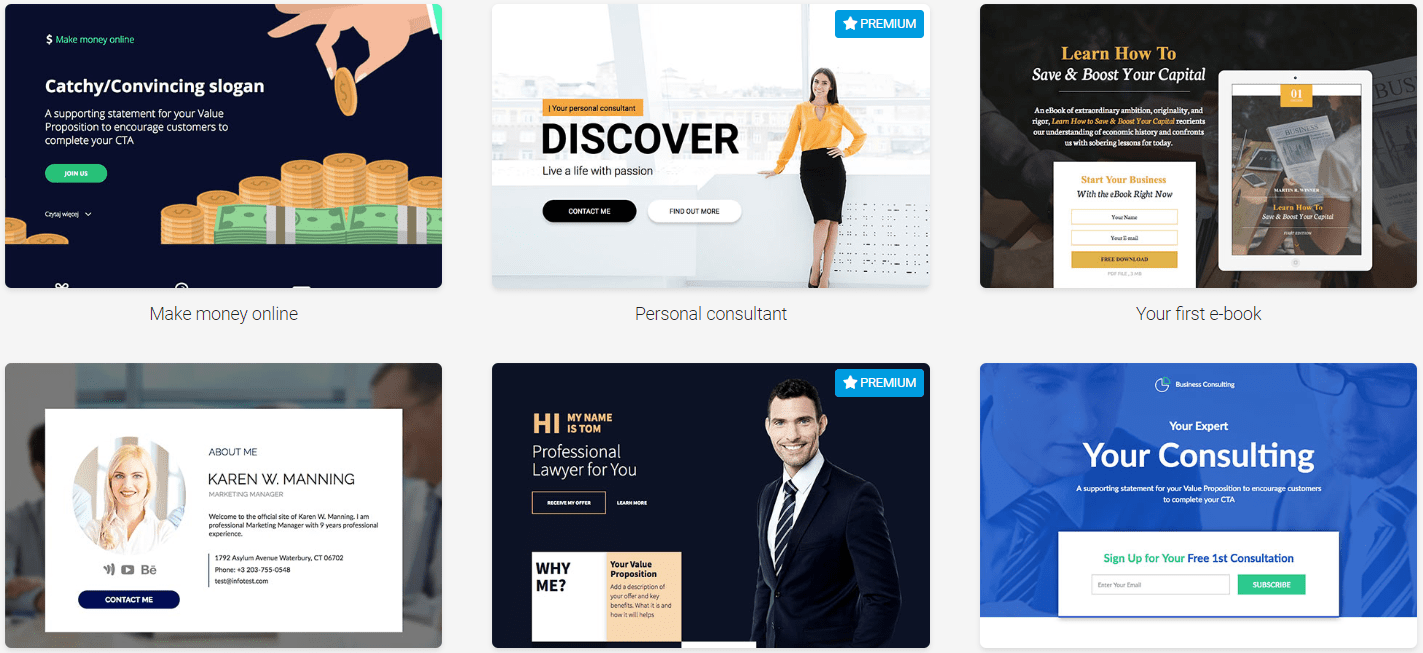
Take a look down below and you’ll see just a few of the templates that they offer:

Keep in mind that those were some of the templates from the business category.
I counted all of their templates in a previous post and there was a whopping 236 of them!
Related Review Post: Click here to learn more about this tool.
For my initial Landingi walkthrough, I needed up picking the template called Simple Newsletter.
- So I picked my template.
- You need to then give it a name.
- And then you end up on their landing page editor.
Here is a quick glimpse of what things look like on the inside of their landing page editor:

So not only is setting up a landing page an easy process?
It’s also easy to use their landing page builder.
On the left side of the picture above, you can choose from multiple elements to use like:
- Boxes and icons.
- Buttons and forms.
- Counters and sections.
- Text, images, and videos.
There’s even an option to use HTML is you want (which I prefer staying far away from).
You’ll like that Landingi actually comes with a true drag-and-drop editor.
This means that you can drag and drop sections absolutely anywhere on your landing page.
The Big Benefit: More flexibility and freedom for an overall smoother landing page experience.
Here is something else that you usually don’t see with landing page builders:

This software also allows you to edit your thank you page in the same editor without leaving.
Note: I put a red rectangle around the Thank You tab in the picture above.
When it comes to other landing page and sales funnel builders?
Here is what the process normally looks like:
- Create and save your landing page and then back out.
- Create a completely new thank you page and edit it separately.
You pretty much get a two-for-one here when it comes to creating and editing.
All in all?
You’ll have no problem using their silky smooth drag and drop editor.
That means that you can get your landing pages up and running quicker.
You can see for yourself too:
Landingi also comes with the ability to create sales funnels too.
Just keep in mind that creating sales funnels comes with the Automate plan ($79 per month).
I’ll talk more about the price tag of Landingi later, though.
Let’s now compare Unbounce vs Landingi when it comes to landing pages.
Unbounce Landing Pages (Demo Walkthrough)

Should you end choosing Unbounce?
Then the above screenshot is something that you’ll see in your main dashboard.
Similar to Landingi, I’m going to show you the step to creating a landing page with Unbounce.
I think that this really helps with getting a better feel for each tool.
So the first thing you need to do is click on the Create New button (not in the image above).
Similar to Landingi, you will then have the ability to pick from many landing page templates.
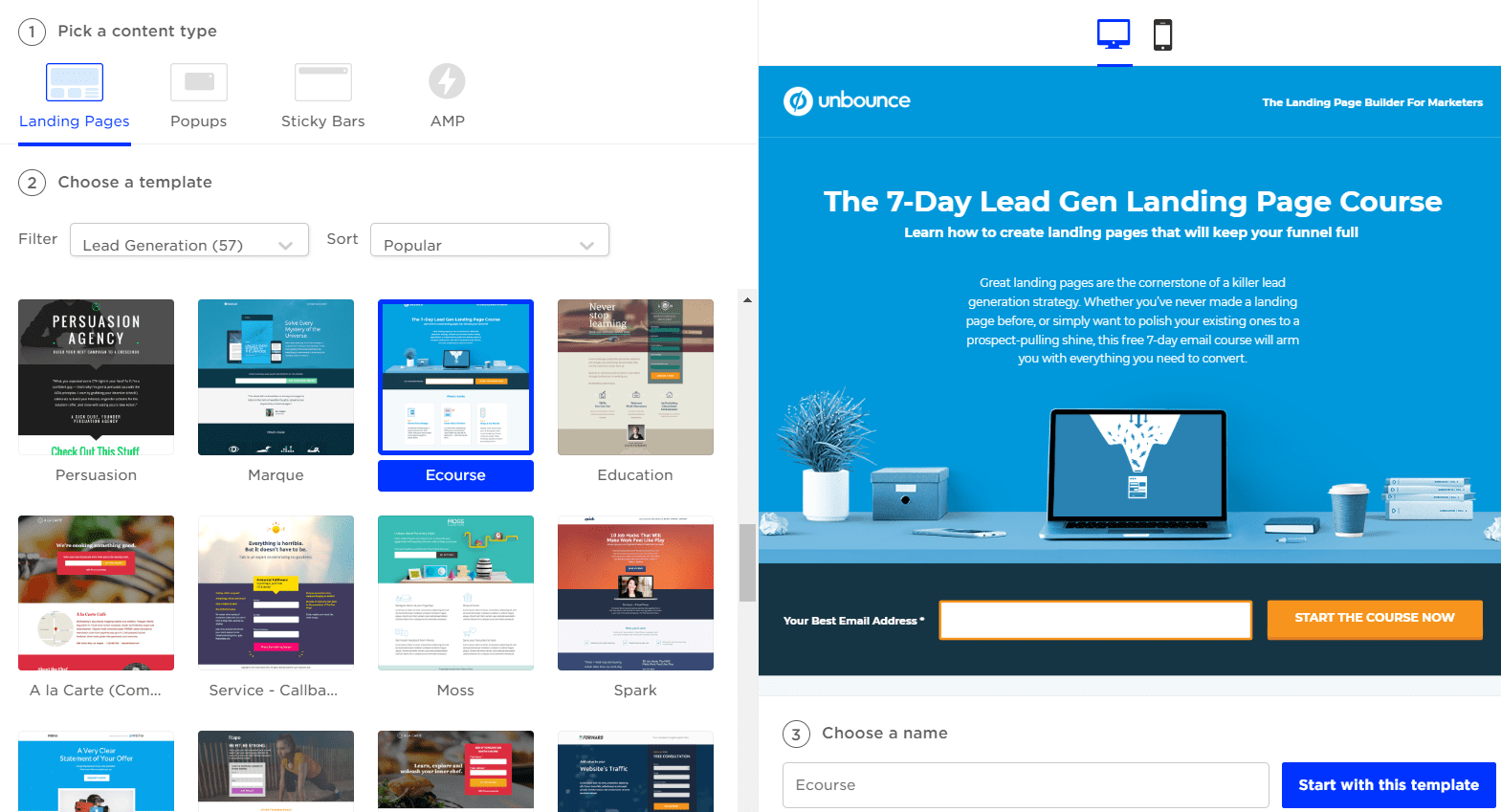
Here is what it looks like (along with a few examples of their templates):
So here’s some more great news when it comes to Unbounce:
Creating a landing page with them is also a really easy process.
Here are the first three simple steps:
- Pick your content-type: landing page, popups, sticky bars, or AMP.
- Choose your template (you can pick from over 100 spiffy templates).
- Choose a name for your landing page and click on the Start with this template button.
So for me personally?
- I picked a lead generating landing page template.
- Then I gave it the name of Unbounce Landing Page (clever, I know).
After those simple steps, you will then get taken to the Unbounce landing page editor:

Let’s take a quick look at the Unbounce landing page editor and what it offers:
- First, you have your landing page template in the middle.
- The left side of the page will be all of the sections to choose from.
All you have to do is drag the sections on the left to the middle of the page (anywhere you want).
It’s yet another true drag-and-drop builder.
Note: The landing page editor for both Unbounce and Landingi is very similar.
All in all?
You will certainly not have too many problems when it comes to creating landing pages.
Care to see for yourself?
If you’d like to get a little bit more information when it comes to Unbounce?
Feel free to read the post below.
Related Unbounce Post: Click here to read the entire Unbounce review article.
Plus, Unbounce comes with a nice discount when you click on the link above as well.
Speaking of discounts and prices?
Let’s continue on now when it comes to the Unbounce vs Landingi prices.
Landingi Vs Unbounce: How Much Are They?
If you were just looking to invest the least amount of money?
Then Landingi would be the obvious winner.
Price isn’t always the main reason why someone would choose one software over another.
I know it can be helpful though.
So let’s first take a look at how much Landingi costs and then compare it to Unbounce.
How Much Is Landingi?

Here is what you can expect to invest when it comes to Landingi:
- Landingi Core plan is $39 per month.
- Landingi Create plan is $59 per month.
- Landingi Automation plan is $79 per month.
As highlighted at the beginning of this post, the core plan comes with:
- 10 popups.
- 100,000 monthly visits.
- Unlimited landing pages.
Unlimited landing pages is quite a nice perk if you want to create a ton of them.
Landingi also comes with the ability to use sales funnels and an autoresponder.
That’s only for the Automate plan though.
I also wrote a separate post below that talks about all of the Landingi prices.
Related: More Landingi pricing details.
You can also save get a 15% discount on any of the plans that are shown above.
I explained how this easy process works if you’d like some more information below.
Related: How the Landingi discount works.
Now onto Unbounce.
How Much Is Unbounce?
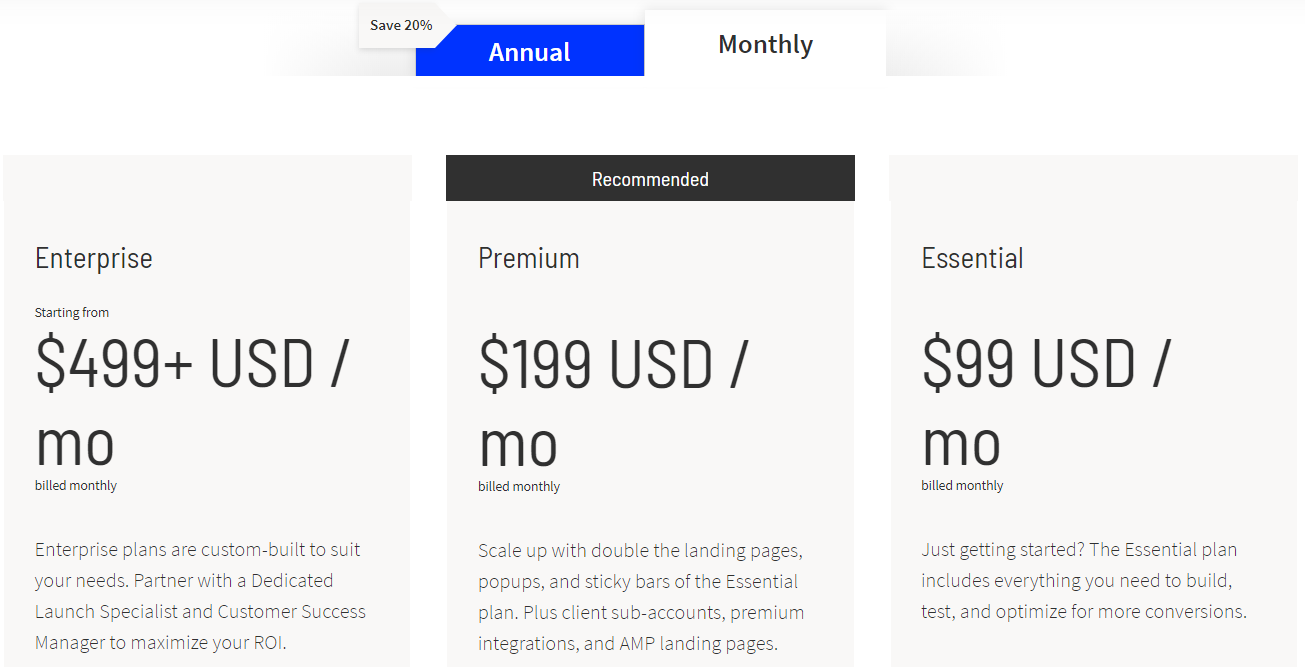
Unbounce happens to come with three total plans:
- Unbounce Essential is $99 per month.
- Unbounce Premium is $199 per month.
- Unbounce Enterprise is $499 per month.
As also highlighted at the beginning of this post, the Essential plan comes with:
- 75 landing pages.
- 8 popups and sticky bars.
- 500,000 unique monthly visitors.
Keep in mind that you will get some more perks as you choose higher plans.
You can get more information about the perks and prices in the post below (if needed).
Related: More details about the pricing plans for Unbounce.
Similar to Landingi, you can also save when you go through the Unbounce link above.
Related: How the Unbounce discount works.
So now you know more about the features and prices of each software tool.
Let’s now get to the end of this post and wrap things up.
Landingi Vs Unbounce: The Closing Summary
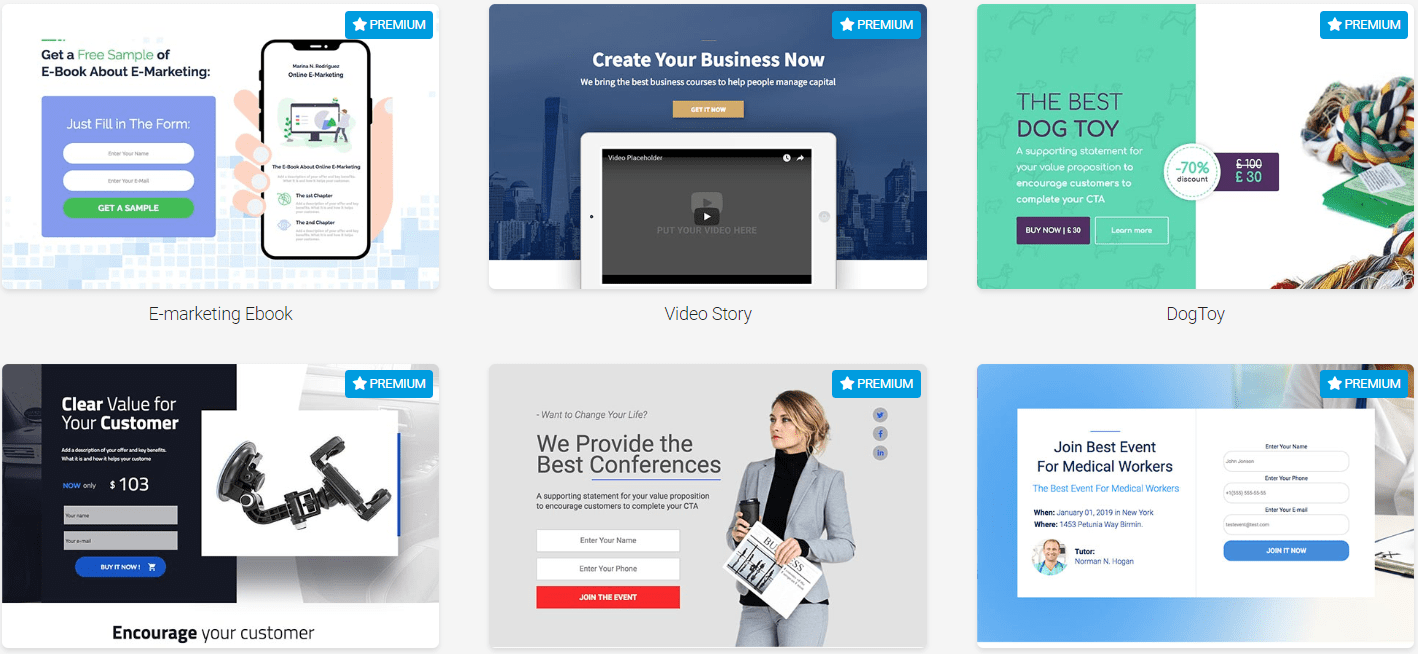
Here are the big differences when it comes to Landingi vs Unbounce. Landingi and Unbounce both feature the ability to create simple landing pages and popups. Landini has the extra benefit of having unlimited landing pages and a lower price.
So who is going to be the best pick for you?
This is the moment of truth.
Here we go.
Use Unbounce If
- You want a simple to use landing page builder.
- The slightly higher price-tag isn’t a big deal to you.
- You want more powerful pay-per-click related features.
- You need the ability to get more monthly unique visitors.
Those are some of the biggest perks when it comes to using Unbounce.
If you were comparing the $99 Unbounce plan to the $79 Landingi plan?
You’d pay a little bit more but also get more value from Unbounce.
So if those bullet-points above sound like music to your marketing ears?
Then I highly recommend that you try Unbounce:
And don’t forget that the link above comes with a special discount as well.
Now, on the other hand, there is Landingi.
Use Landingi If
- You want a simple to use landing page builder.
- You want a slightly cheaper price tag (depending on the plan that you pick).
- The ability to create an unlimited amount of landing pages is a big deal to you.
Landingi is a great choice if you ONLY want landing pages.
Not only can you create an unlimited amount of them, but their Core plan is inexpensive.
So if you want to give Landingi a try?
Remember: Landingi also comes with a 15% discount just by using the link above.
I want to say thank you for taking the time to read about Unbounce vs Landingi.
Hopefully, this post helped you when it comes to making the best landing page choice.
Related Landingi Post
Have the best day ever!
About the Author James Canzanella
A former personal trainer who went from unemployment to online business success. He's been marketing since 2012 and (still) enjoys lifting weights, listening to rock music, and relentlessly quoting movie lines.
